

ཞིབ་བརྗོད།
Early bird pricing for WooCommerce that runs itself
Want to reward your first customers, but don’t want to change prices by hand at midnight or hand out coupon codes? TierStep gives WooCommerce real early bird pricing. Set price steps by units sold – for example the first 50 at $19, the next 100 at $29, then the regular price – and the price increases automatically after each step sells out. This is sometimes called progressive pricing or sales-based pricing.
It is the simplest way to run an early bird discount, launch pricing for a new product, a limited first batch or Kickstarter-style pricing in your own WooCommerce store. Shoppers see how many units are left at the current price, what the next price will be, and how long the offer runs, so they buy now instead of later. The urgency is honest: the cheaper price runs out because it actually sold.
100% free: no Pro version, nothing locked
Every feature on this page is free. There is no paid version, no upgrade prompts and no feature limits: unlimited tiers, store-wide campaigns, countdowns, checkout holds, stats and blocks are all included.
Popular ways to use TierStep
- Early bird discount for a product launch: the first 100 buyers pay less, then the price returns to normal.
- Increase the price after X sales: raise the price by $10 after every 50 units, with no manual edits.
- Limited first batch or pre-sale: sell the first production run at a founders’ price.
- Kickstarter-style reward tiers: “Super early bird”, “Early bird”, then the regular price, in your own store.
- Courses and digital downloads: reward the first students or buyers of a new course, ebook or template pack.
- Merch drops: a lower price for the first units of a limited drop.
- Early-bird tickets and seats: early-bird pricing for event tickets, workshop seats or course places sold as WooCommerce products.
- Launch week across the store: one campaign for a whole category, with percentage-off tiers that shrink as each product sells.
How it works
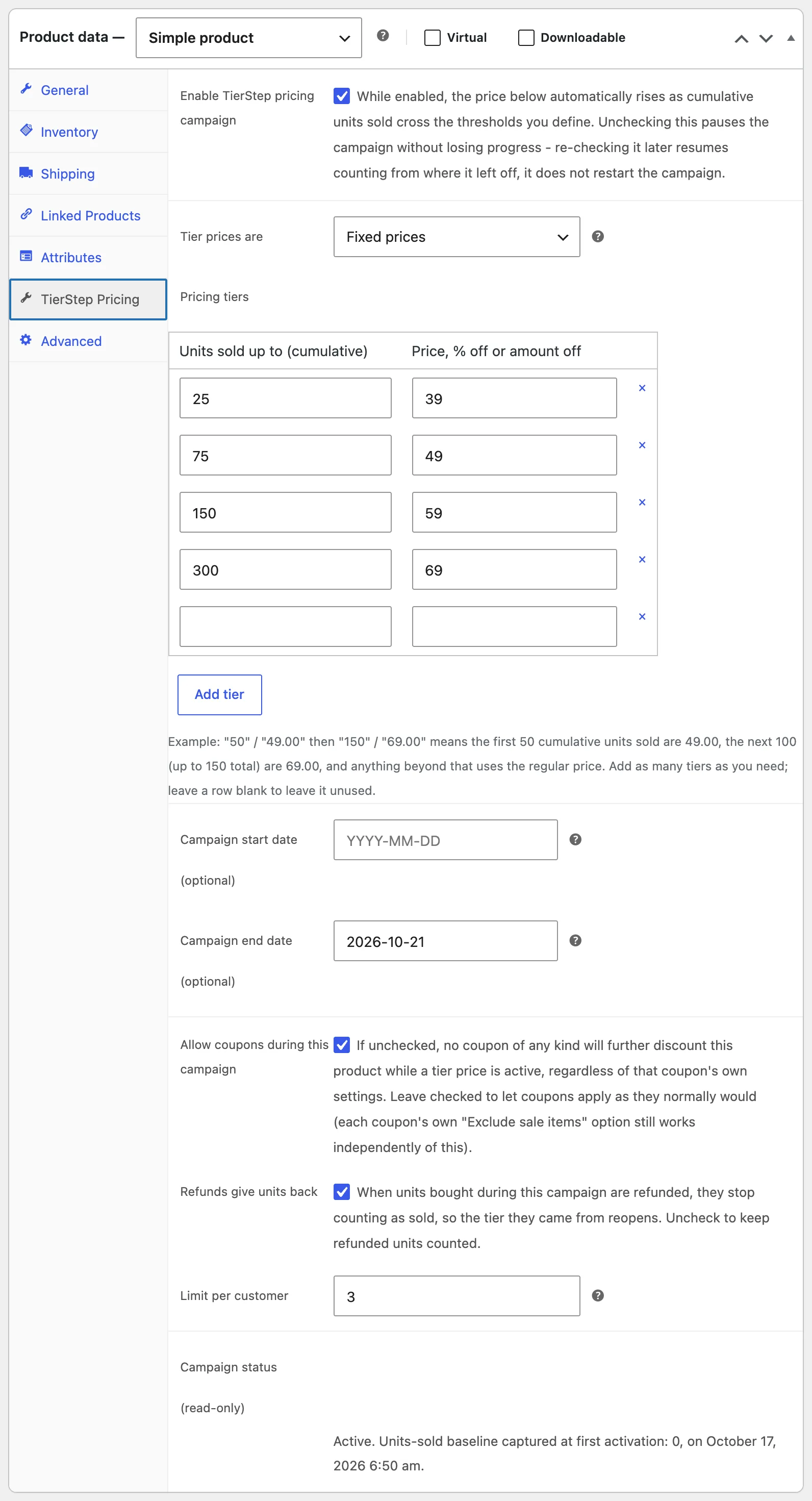
- Edit a product, open the TierStep Pricing tab and add your price steps (units sold up to, and the price).
- Optionally add a start date, an end date and a limit per customer.
- Publish. TierStep shows the offer on your store and moves to the next price the moment the current step sells out.
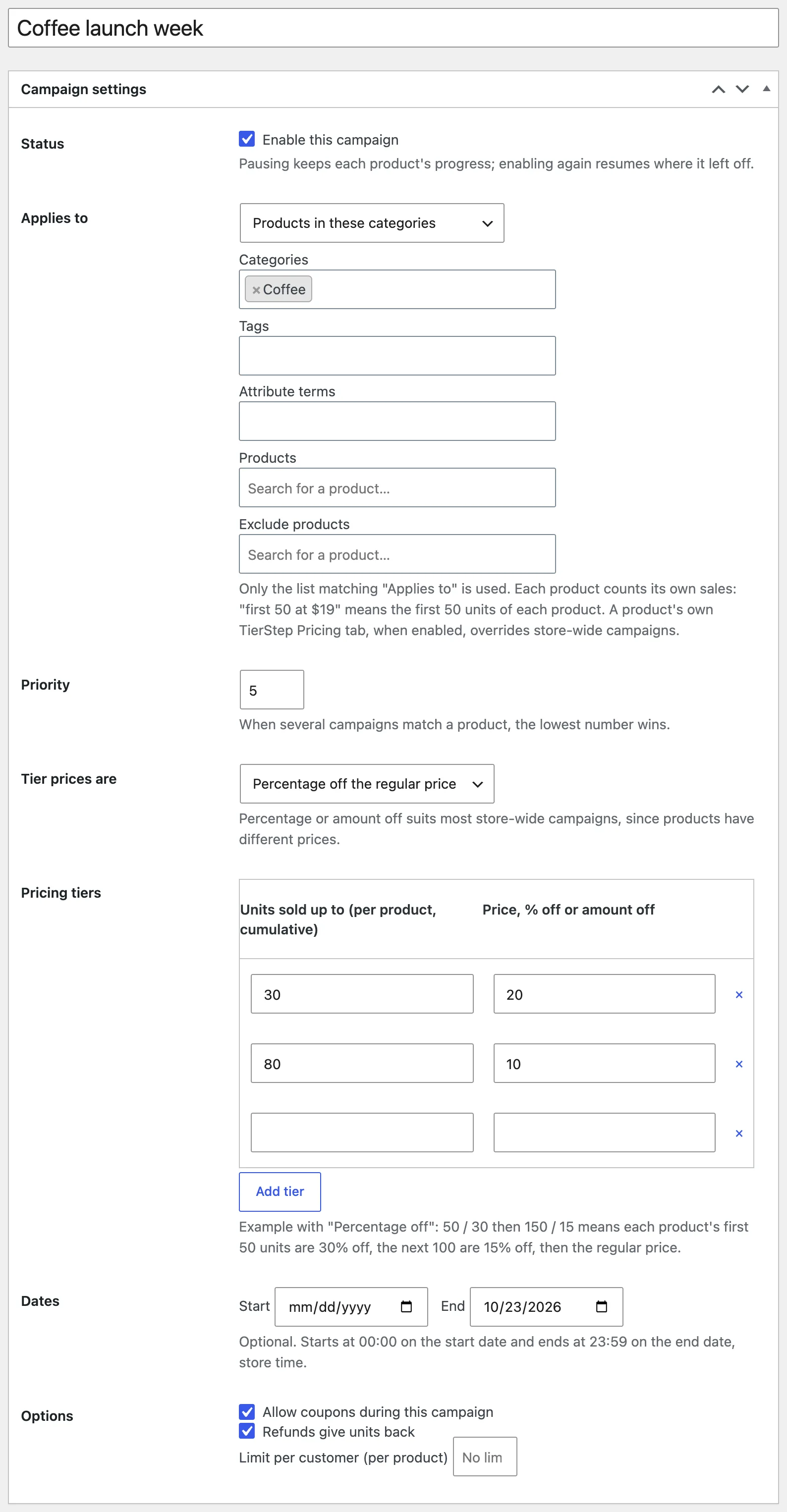
Want one offer for many products? Create a store-wide campaign under Products > TierStep Campaigns and pick categories, tags, attribute terms or products.
What shoppers see
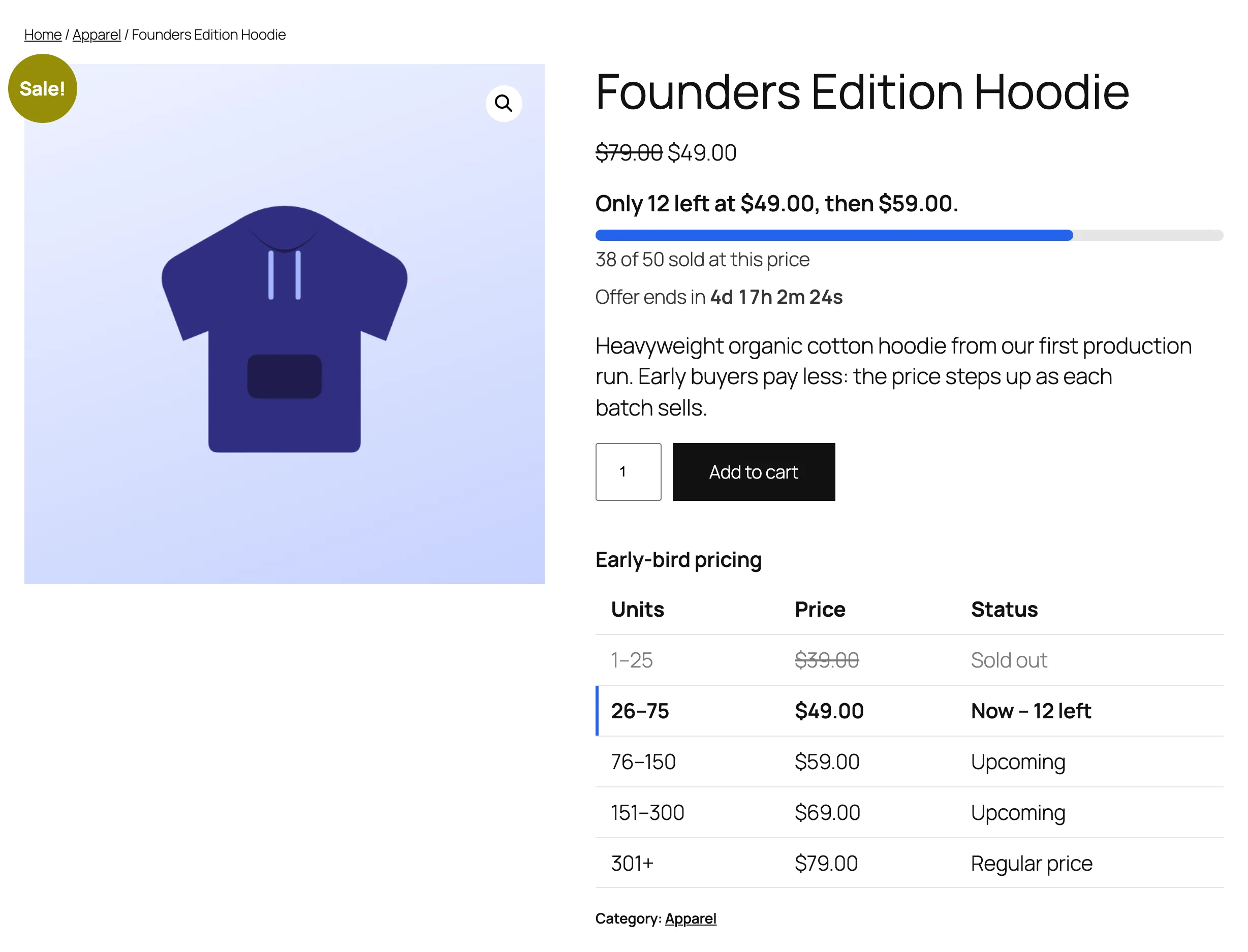
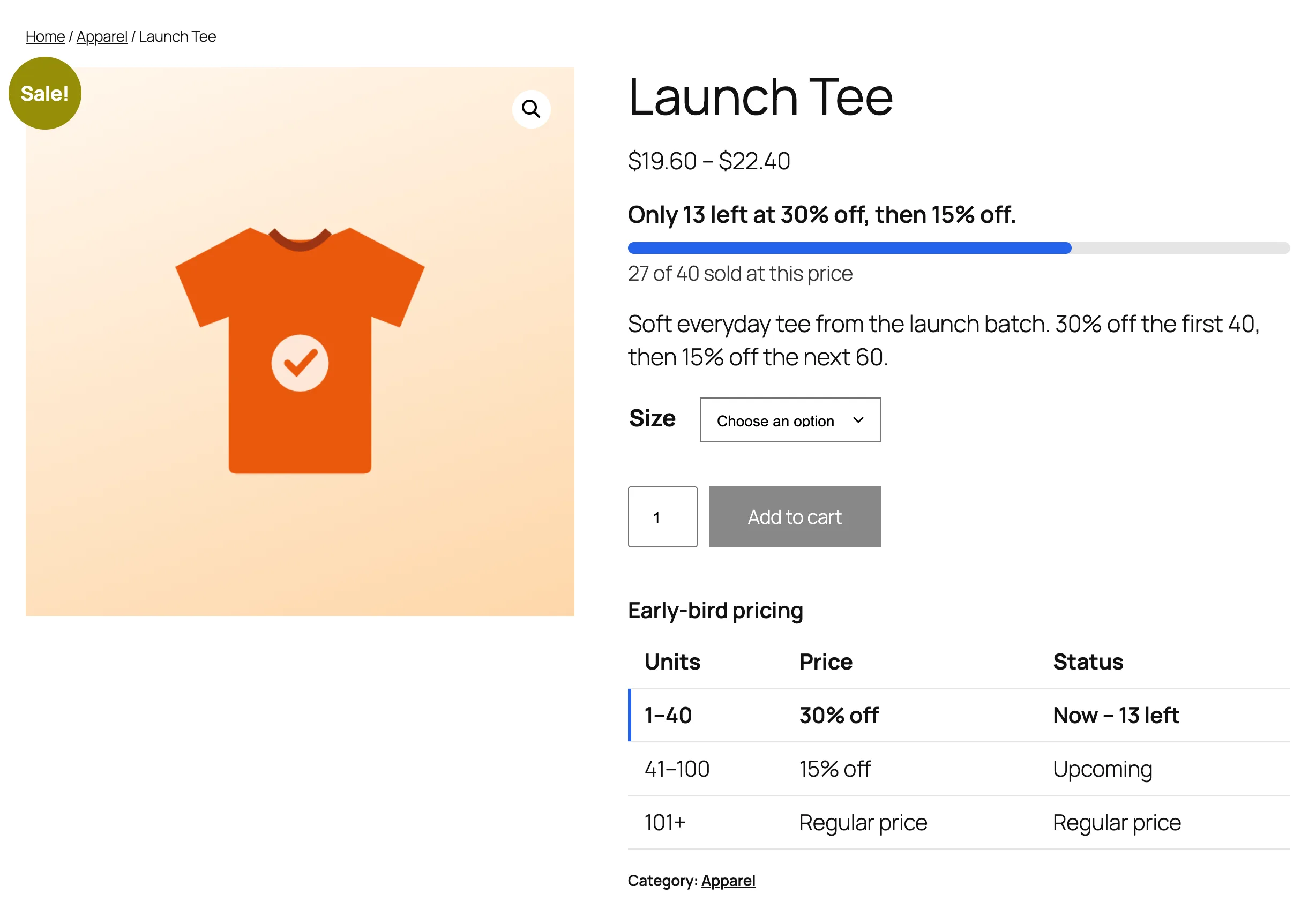
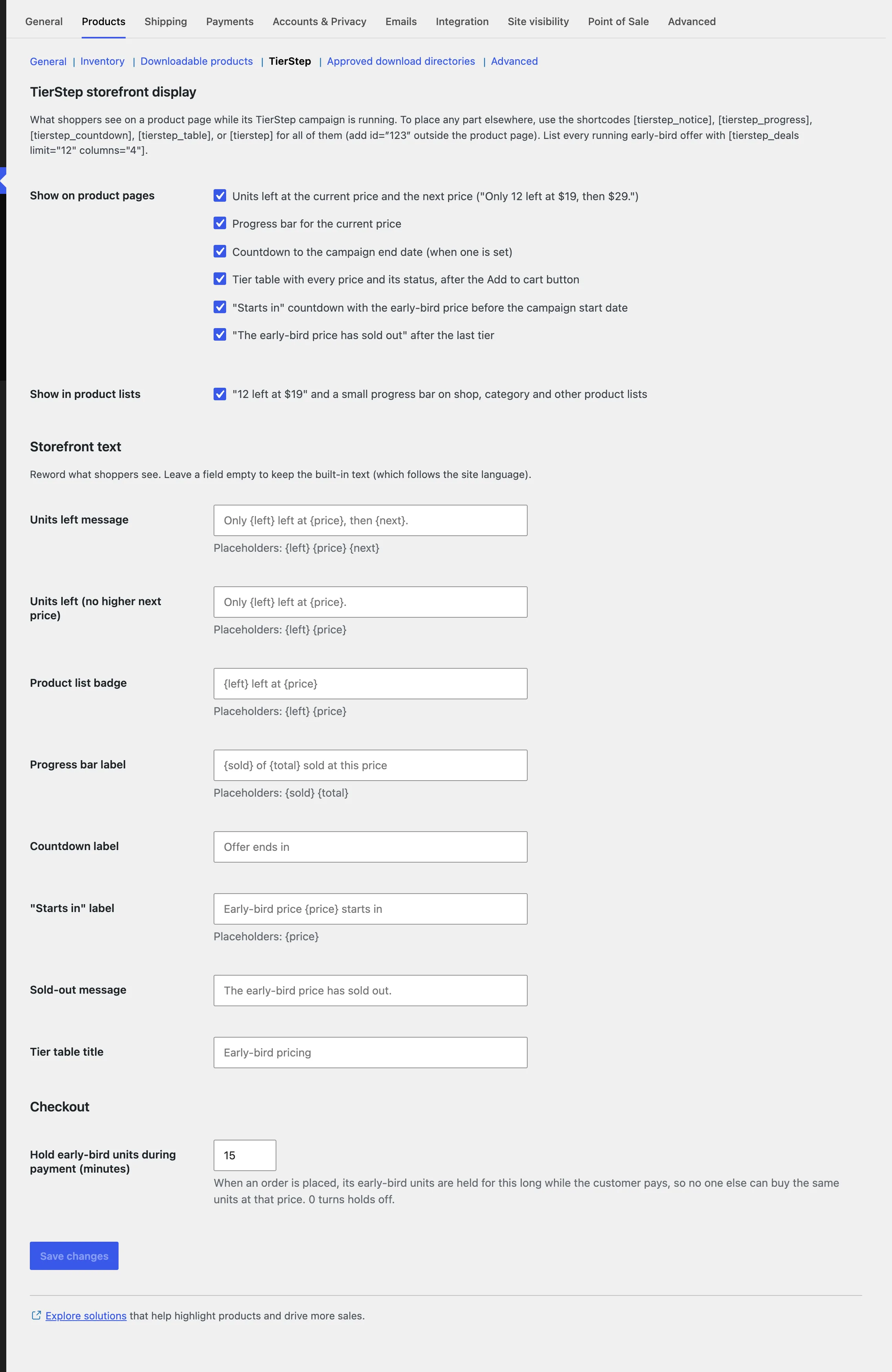
- “Only 12 left at $19, then $29.” right under the product price.
- A progress bar for the current price (“38 of 50 sold at this price”).
- A live countdown to the campaign end, and a “starts in” countdown with the early-bird price before it opens.
- A tier table after the Add to cart button: sold out, current (with units left), upcoming, then the regular price.
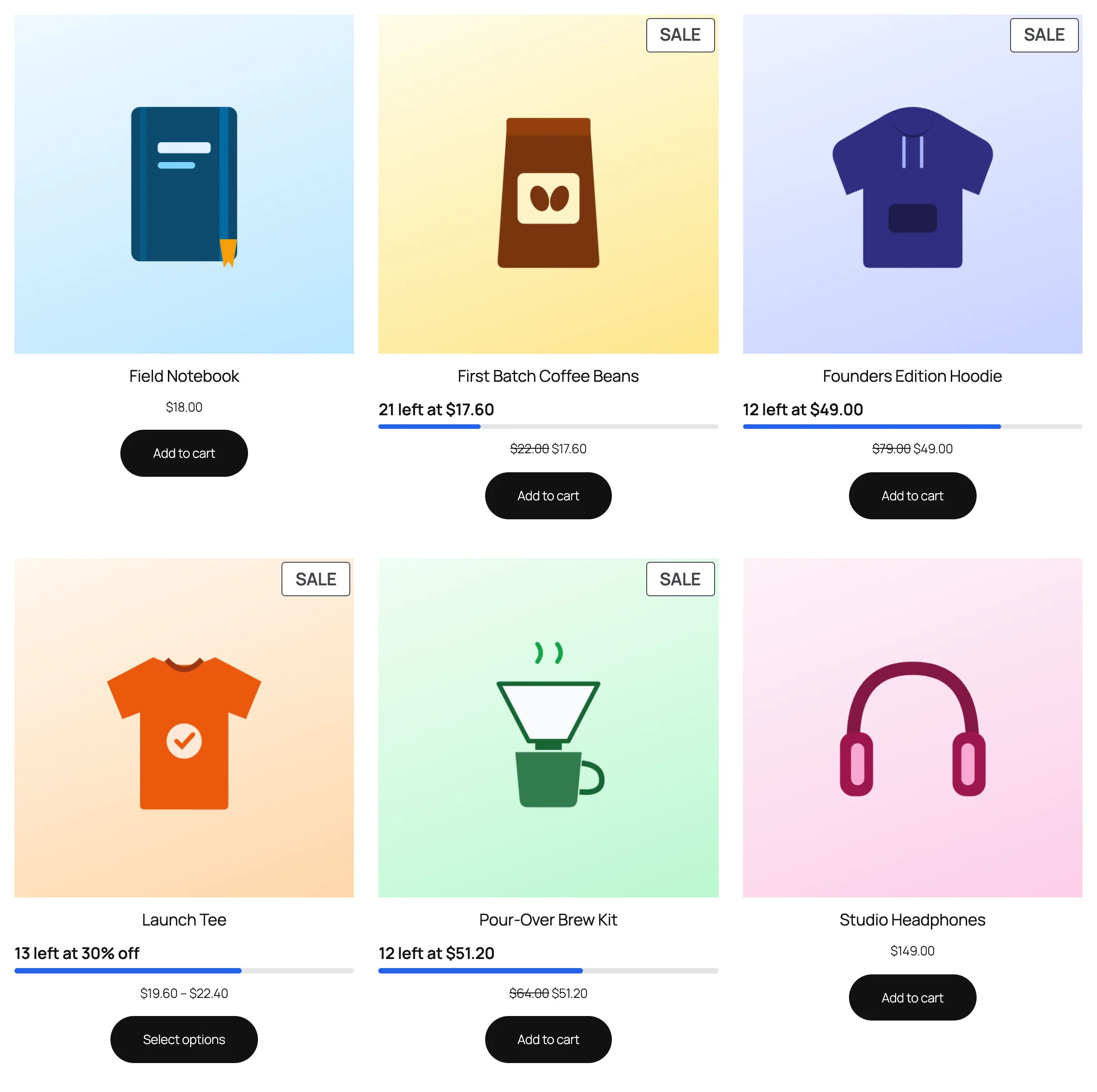
- “12 left at $19” badges with a small progress bar on shop and category pages.
- An optional “The early-bird price has sold out” message after the last tier.
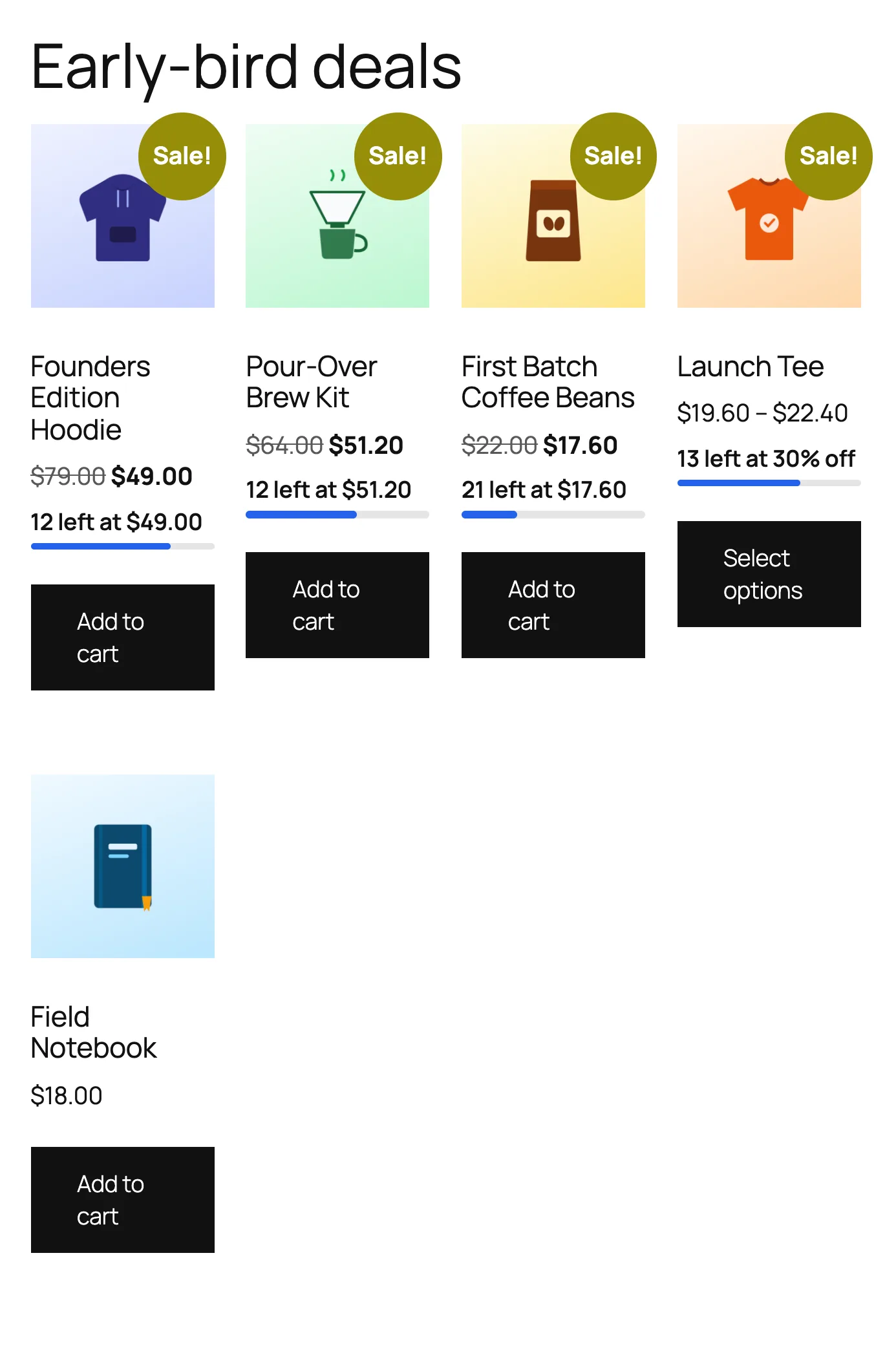
- An “Early-bird deals” page in seconds with
[tierstep_deals]or the “TierStep Early-Bird Deals” block.
Pricing and campaigns
- Unlimited price tiers, as fixed prices, a percentage off, or an amount off the regular price.
- Simple and variable products. Variations share one count, and each is priced from its own regular price.
- Store-wide campaigns for all products, categories, tags, attribute terms or picked products, with excludes and priorities (Products > TierStep Campaigns). A product’s own TierStep tab can still override.
- Optional start and end dates. Pause any time without losing progress.
- Choose per campaign whether coupons may discount early-bird prices further.
Fair, safe launches
- One order can’t take more units than the current tier has left, on the classic and block checkouts.
- Checkout holds: placed orders hold their early-bird units while the customer pays, so two buyers can’t take the same last units.
- Limit per customer: cap how many units one buyer gets at early-bird prices across all their orders.
- Refunds give units back to the tier they were sold at, without ever counting a unit twice.
- Shoppers whose cart price is no longer available get a clear message instead of a wrong price.
For store owners
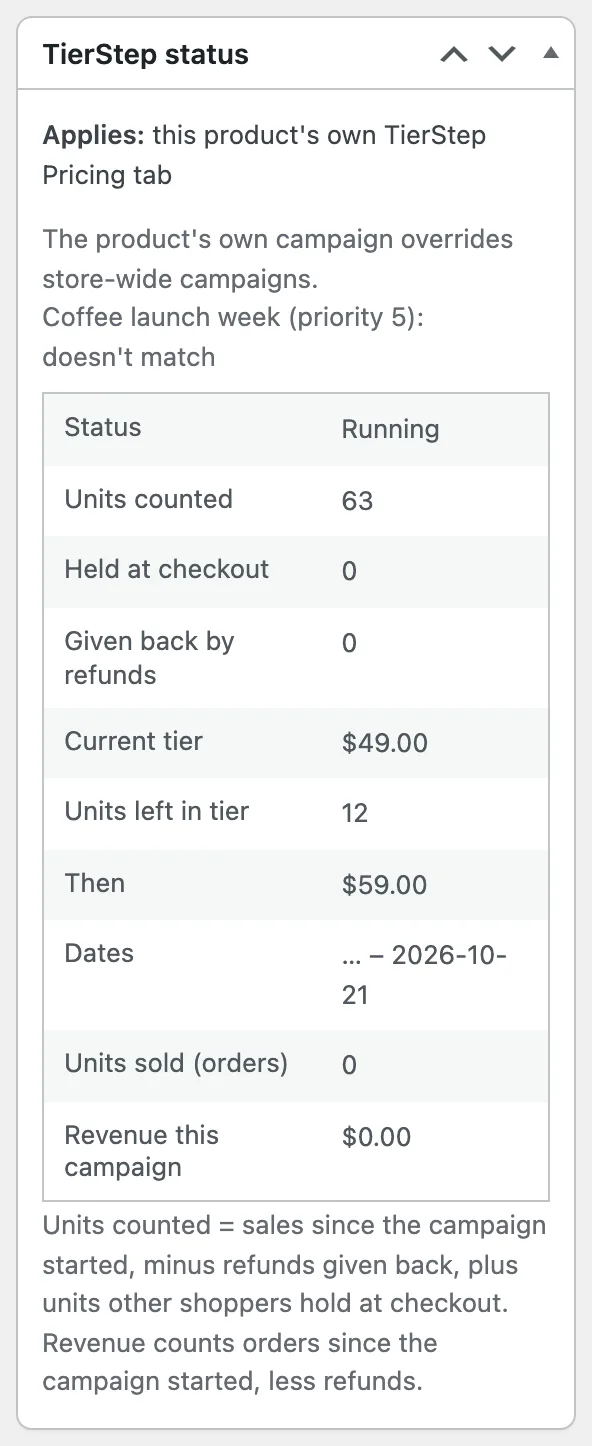
- A “TierStep status” box on every product shows which campaign applies and why, units counted, held and given back, the current tier, what comes next, and revenue this campaign.
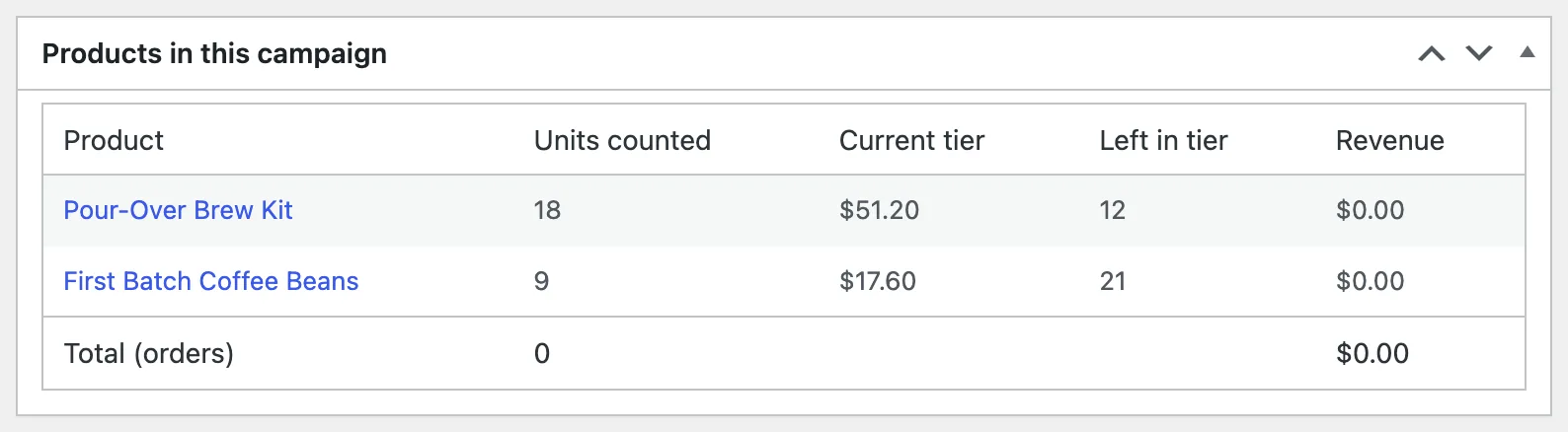
- Store-wide campaigns list every product with its units, tier and revenue.
- Switch each display part on or off and reword every message (WooCommerce > Settings > Products > TierStep).
- Blocks: “TierStep Early Bird” and “TierStep Early-Bird Deals”. Shortcodes:
[tierstep],[tierstep_notice],[tierstep_progress],[tierstep_countdown],[tierstep_table],[tierstep_deals]. - Works with classic and block themes, HPOS (High-Performance Order Storage) and the WooCommerce Cart and Checkout blocks.
Early bird pricing vs bulk (tiered quantity) discounts
TierStep is not a bulk or wholesale discount plugin. Bulk discounts lower the price when one customer buys more units in one order. Early bird pricing changes the price for everyone as total sales grow. If you are launching something and want early buyers to get the best deal, you want early bird pricing.
Compatibility
- WooCommerce 8.0 or later, WordPress 6.7 or later, PHP 7.4 or later.
- Classic and block themes, including the WooCommerce Cart and Checkout blocks.
- HPOS (High-Performance Order Storage).
- Simple and variable products.
Good to know
- Grouped and external/affiliate products aren’t supported.
- “Units sold” follows WooCommerce’s own sales counter, so cancelled orders stop counting.
Documentation and support
Step-by-step guides with screenshots for every feature: TierStep documentation. Questions are answered in the WordPress.org support forum.
གཏུབ་རེིས།

Blocks
This plugin provides 2 blocks.
- TierStep Early-Bird Deals Products with a running TierStep campaign, ending soonest first.
- TierStep Early Bird Units left, progress bar, countdown and tier table for a product's TierStep campaign.
སྒྲིག་འཇུག
- Make sure WooCommerce is installed and active – this plugin does nothing without it.
- Upload the plugin files to the
/wp-content/plugins/tierstep-pricing-for-woocommercedirectory, or install the plugin through the WordPress plugins screen directly. - Activate the plugin through the “Plugins” screen in WordPress.
- Edit a simple or variable product, open the “TierStep Pricing” tab in the Product data box, check “Enable TierStep pricing campaign”, fill in one or more tiers (cumulative units sold / price), and optionally a start and/or end date.
- Save/update the product.
New to TierStep? Follow Getting started for your first campaign.
FAQ
-
How do I set up an early bird discount in WooCommerce?
-
Install TierStep, edit the product, open the TierStep Pricing tab, tick “Enable TierStep pricing campaign” and add a tier such as “100” units at your early-bird price. The first 100 units sell at that price, then the regular price applies. Add more tiers for more steps.
-
How do I increase a product’s price automatically after a set number of sales?
-
Add one tier per price step. For example “50 / 19” and “150 / 29” sells the first 50 units at $19, the next 100 at $29, then the regular price. TierStep counts sales made after the campaign starts and switches the price the moment a step sells out.
-
Can I use it for early-bird event tickets, workshop seats or course places?
-
Yes, when they are sold as simple or variable WooCommerce products. The tiers count units sold, so “the first 30 tickets at $49” works the same way as a physical product.
-
Is TierStep really free? Is there a Pro version?
-
Yes, it’s 100% free, and there is no Pro version. Every feature on this page is included: unlimited tiers, store-wide campaigns, variable products, countdowns, checkout holds, per-customer limits, blocks and stats. No upgrade prompts, no locked settings.
-
Does TierStep change my product’s regular price?
-
No. TierStep never edits the prices you saved. It applies the current tier price while the campaign runs, through WooCommerce’s own price functions, and your regular price is used again as soon as the campaign ends, is paused or the last tier sells out.
-
What about Google Shopping and other product feeds?
-
Anything that reads the price through WooCommerce, including the Store API and most feed plugins, gets the current tier price. Feeds that copy prices on a schedule pick up a new tier at their next sync, so use a short sync interval during a launch to keep Google Merchant Center prices matching your store.
-
Can I use it with a pre-order plugin?
-
TierStep only changes the price, so it can run alongside plugins that handle pre-order dates and payment, as long as they use the normal WooCommerce product price. Test the combination on a staging site before a big launch.
-
What if I set both a start date and an end date?
-
The campaign runs from 00:00 on the start date to 23:59 on the end date, store time, and stops earlier if the last tier sells out. Before the start date shoppers can see a “starts in” countdown with the early-bird price.
-
Is this a quantity-discount (bulk or wholesale) pricing plugin?
-
No. Bulk and wholesale “tiered pricing” plugins lower the price when one customer buys more units in a single order. TierStep does the opposite over time: the price of a product increases for everyone as its total sales cross the thresholds you set – for example, early-bird pricing for the first 50 buyers.
-
Can I show the “units left” message, progress bar, countdown or tier table somewhere else?
-
Yes. They appear on the product page automatically (each can be switched off under WooCommerce > Settings > Products > TierStep). To place them anywhere else, use
[tierstep_notice],[tierstep_progress],[tierstep_countdown],[tierstep_table], or[tierstep]for all of them. On other pages, add the product ID:[tierstep id="123"]. Developers can change or hide the message text with thecommercewp_woo_tierstep_notice_textfilter. -
Can I run one campaign across many products?
-
Yes. Go to Products > TierStep Campaigns > Add campaign, choose what it applies to (all products, categories, tags, attribute terms or specific products), set percentage or amount-off tiers, and enable it. Each product counts its own units (“first 50” means the first 50 of each product). When several campaigns match, the lowest priority number wins, and a campaign set on a product’s own TierStep Pricing tab always takes precedence.
-
Can tiers be discounts instead of fixed prices?
-
Yes. On the TierStep Pricing tab, set “Tier prices are” to “Percentage off the regular price” or “Fixed amount off the regular price”, then enter the discount for each tier (for example 30, then 20, then 10). A discount never takes the price below zero, and a percentage can’t be more than 100.
-
What happens if two people buy the last early-bird units at the same time?
-
When an order is placed, TierStep re-checks the units under a lock and holds them while the customer pays. The second order gets a clear “the early-bird price just changed” message instead of a price that’s no longer available. The same check runs whenever a cart or checkout page loads, on both classic and block checkouts, so a shopper whose cart price has sold out is told how many units are still available at that price. Nobody is charged a price that’s no longer valid. Held units count as taken for everyone else until the order is paid, fails, is cancelled, or the hold expires (WooCommerce > Settings > Products > TierStep, default 15 minutes).
-
Can I stop one customer buying the whole early-bird tier?
-
Yes. Set “Limit per customer” on the TierStep Pricing tab (for example 2). Their earlier orders in the same campaign count toward it, refunded units don’t, and customers are matched by account and billing email. The limit only applies while a campaign price is active.
-
How do I make an “Early-bird deals” page?
-
Create a page and add
[tierstep_deals]. It shows every product with a running TierStep campaign, ending soonest first. Options:limit="12",columns="4", andupcoming="yes"to also show campaigns that haven’t started yet. -
How many price tiers can I add?
-
As many as you need. Use the “Add tier” button on the TierStep Pricing tab. (Developers can set a ceiling with the
commercewp_woo_tierstep_max_tiersfilter; the default is 100.) -
When does the countdown appear?
-
Only when the campaign has an end date. It counts down to the end of that day in your store’s time zone and keeps running on cached pages.
-
Does this work with variable products?
-
Yes. Set the campaign on the variable product’s TierStep Pricing tab (or with a store-wide campaign). All its variations share one count: “first 50” means the first 50 units across all sizes and colours, like WooCommerce’s own sales count. Each variation’s price comes from its own regular price, so “30% off” works across variations with different prices. Shoppers see the discount (“Only 12 left at 30% off, then 15% off.”). Grouped and external/affiliate products are not supported.
-
Does pausing a campaign (unchecking “Enable”) reset my pricing tiers back to the start?
-
No. The very first time a campaign is enabled, the plugin records how many units had already sold before that point. Unchecking “Enable” only pauses price changes – it does not erase that starting point. Re-enabling the campaign later resumes counting from the same baseline, not a new one.
One thing to know: because this plugin counts units using WooCommerce’s own total-sales tracking (rather than a separate counter), any sales that happen while the campaign is paused still count toward the tier allocation once you turn it back on.
-
Is there a block for the block editor? Does it work with block themes?
-
Yes. Add the “TierStep Early Bird” block to show a product’s units left, progress bar, countdown and tier table anywhere, and the “TierStep Early-Bird Deals” block for a list of running offers. Everything also works in classic and block themes without adding anything: the display appears on product pages automatically.
-
Can I change or translate the text shoppers see?
-
Yes. Reword every message under WooCommerce > Settings > Products > TierStep, with placeholders such as {left} and {price}. Leave a field empty to keep the built-in text, which follows your site language and can be translated like any WordPress.org plugin.
-
Does it work with page caching?
-
Yes. Prices in the cart and at checkout are always worked out live, so shoppers never pay a stale price, and countdowns keep ticking on cached pages. The “units left” text on a fully cached product page updates when that page’s cache refreshes, so use a short cache lifetime for product pages during a busy launch.
-
What happens to my campaigns if I deactivate or delete TierStep?
-
Deactivating stops the early-bird prices and keeps all your campaigns. Deleting the plugin also keeps them, so reinstalling picks up where you left off. To remove all TierStep data when deleting, add
define( 'COMMERCEWP_WOO_TIERSTEP_REMOVE_ALL_DATA', true );to wp-config.php first, the same approach WooCommerce uses. -
Will coupons still work on a product with an active tier price?
-
Yes, by default. Each campaign also has its own “Allow coupons during this campaign” setting – uncheck it if you want to make sure no coupon of any kind can discount the tier price further, regardless of that coupon’s own settings.
-
Does this work with WooCommerce Blocks (the Cart and Checkout blocks) as well as classic checkout?
-
Yes. Pricing, quantity limits, and cart/checkout error messages are all verified against both classic WooCommerce templates and the block-based Cart/Checkout/Store API.
-
Is this compatible with High-Performance Order Storage (HPOS)?
-
Yes. TierStep declares HPOS compatibility and only reads orders through WooCommerce’s own order functions (for refunds, checkout holds and the per-customer limit), never from the database tables directly, so it works the same with HPOS on or off.
གདེང་འཇོག
There are no reviews for this plugin.
བྱས་རྗེས་འཇོག་མཁན། & གསར་འབྱེད་པ།
“TierStep – Early Bird Discount, Launch Pricing & Price Increase After Sales for WooCommerce” is open source software. The following people have contributed to this plugin.
བྱས་རྗེས་འཇོག་མཁན།
Interested in development?
Browse the code, check out the SVN repository, or subscribe to the development log by RSS.
དག་བཅོས་ཉིན་ཐོ།
2.0.0
- New: unlimited tiers, with fixed prices, a percentage off or an amount off the regular price.
- New: variable products (shared count across variations, each priced from its own regular price).
- New: store-wide campaigns for all products, categories, tags, attribute terms or picked products, with excludes and priorities.
- New: shopper display – units left and next price, progress bar, live countdown, “starts in” countdown, tier table, list badges, optional sold-out message.
- New:
[tierstep_deals]and the “TierStep Early-Bird Deals” block; the “TierStep Early Bird” block; shortcodes for every display part. - New: checkout holds, so two buyers can’t take the same last early-bird units.
- New: limit per customer at early-bird prices.
- New: refunds give units back to their tier.
- New: “TierStep status” box and campaign stats with revenue.
- New: display settings and editable storefront text.
- Existing campaigns keep working unchanged.
1.0.0
- Initial public release. Cumulative-units-sold pricing tiers for simple products, optional campaign start/end dates, per-campaign coupon-interaction control, pause/resume without losing progress, and full HPOS + WooCommerce Blocks (Cart/Checkout) compatibility.