
ཞིབ་བརྗོད།
QW Share Buttons helps WordPress visitors share posts, explore content with AI, and discover more from your site. It combines lightweight social sharing, Share to AI, on-site click analytics, and flexible design and placement controls — without requiring frontend jQuery, external icon fonts, or a separate analytics subscription.
Why choose QW Share Buttons? It goes beyond a row of social icons: customize sharing for each device, offer a follow-up action after a share-button click, track interactions on your own site, and control the experience from the WordPress dashboard.
Lightweight sharing, with privacy in mind
- Vanilla JavaScript frontend — sharing interactions do not require frontend jQuery.
- Conditional loading and local icons — assets are loaded according to enabled features; no external icon font or social network SDK is required to display buttons.
- Admin-only Performance Diagnostics — inspect installed frontend/admin asset sizes and loading behavior without adding visitor-facing diagnostics requests.
- On-site click counts — record aggregate sharing-button interactions locally rather than fetching official network counts.
- Works alongside page caches and CDNs — changes to displayed buttons may require clearing the site’s cache.
Share to AI, alongside social networks
- Optional AI destinations — ChatGPT, Claude, Grok, Perplexity, Google AI and Meta AI (Muse).
- Custom AI prompt — configure the question or instruction visitors can send using the existing Share Messages settings.
- Same device and placement controls — show AI buttons directly or inside More, and control visibility on desktop and mobile.
- No AI SDK on page load — AI destinations open only after a visitor clicks a button. A click does not guarantee an AI service will read, summarize, or cite the page; some services require the visitor to paste the prompt.
See which sharing buttons visitors actually use
- Built-in Share Statistics — view clicks by network, device, post and time period.
- Dashboard widget and weekly digest — spot popular content without logging in to another analytics platform.
- CSV export and optional GA4/GTM events — use QW’s data in your own reporting workflow.
- Historical Count Recovery — manually enter verified past counts and previous post URLs after a migration, without altering QW’s recorded click analytics.
- Honest metrics — click counts are not confirmed completed shares or official totals from Facebook, X or other networks.
Customize sharing without code
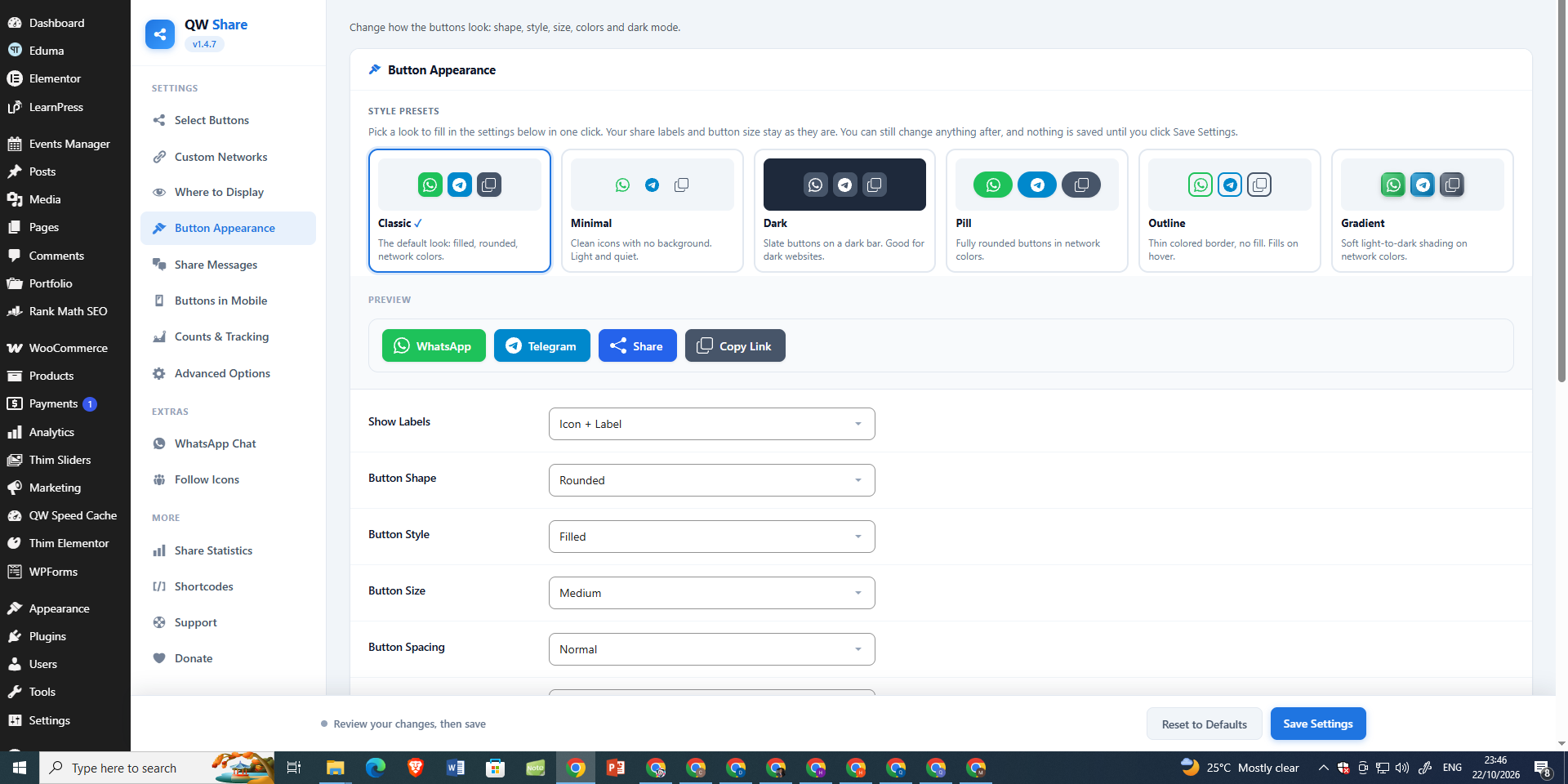
- Six appearance presets and custom colors — adjust shape, labels, spacing, sizes, alignment and button styles with a live preview.
- Flexible placement — inline buttons, a floating share bar that responds to scroll position, optional mobile bottom bar and specific post/page targeting.
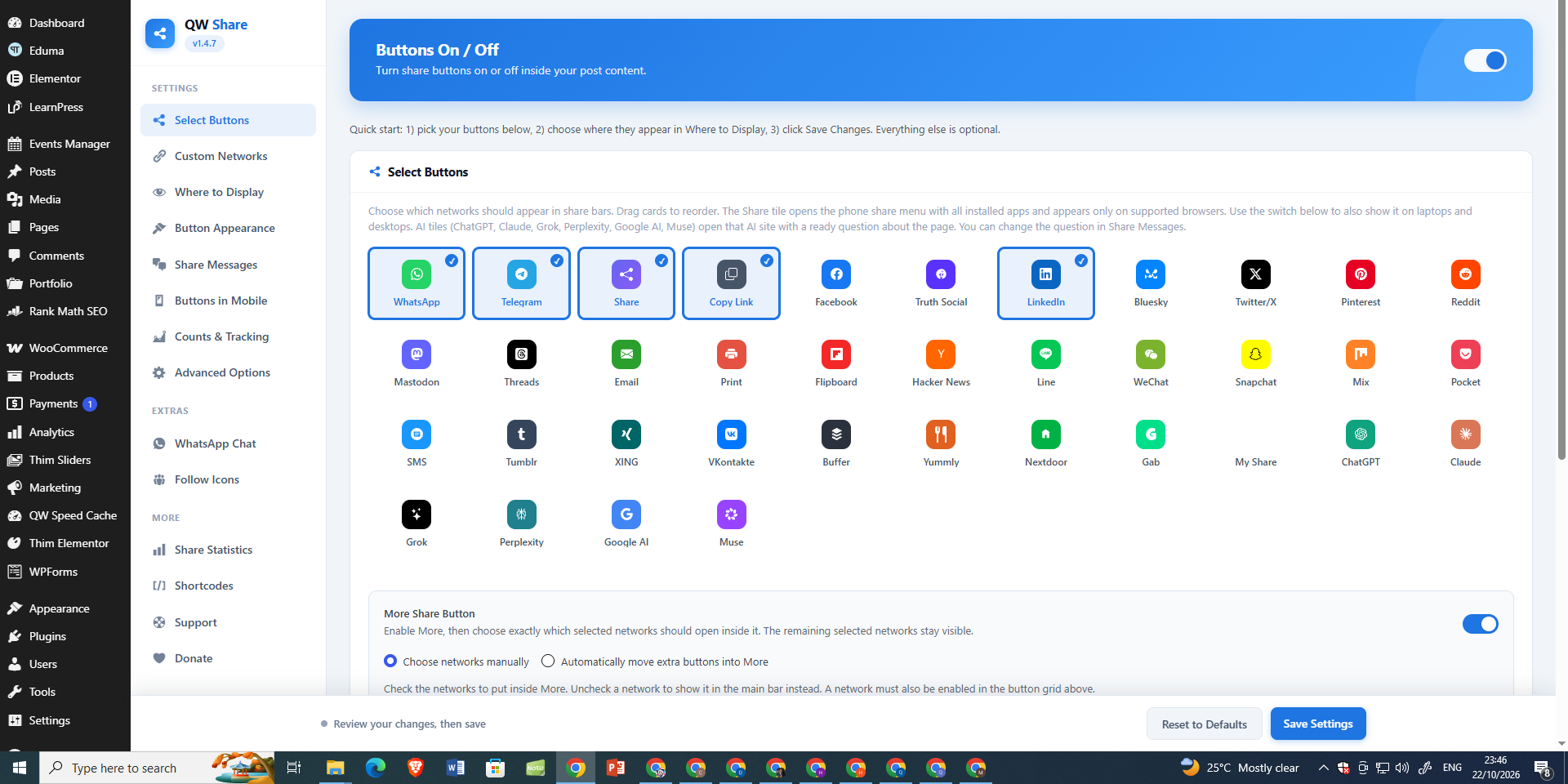
- Per-network desktop/mobile visibility — decide which networks visitors see on each type of device; group extra options in the customizable More menu.
- Global and automatic sharing switches — control automatic placement separately from manually inserted shortcodes and widgets.
- Editor integrations — Gutenberg block, Elementor widget, shortcodes, WordPress widgets and a PHP template tag.
Features that go beyond basic social buttons
- After-Share Actions — show an optional thank-you, follow or call-to-action panel after a sharing interaction. A click does not confirm a completed external share.
- Advanced Pinterest image sharing — control eligible images, minimum width, Pin descriptions and optional per-post Pin images, with image exclusions.
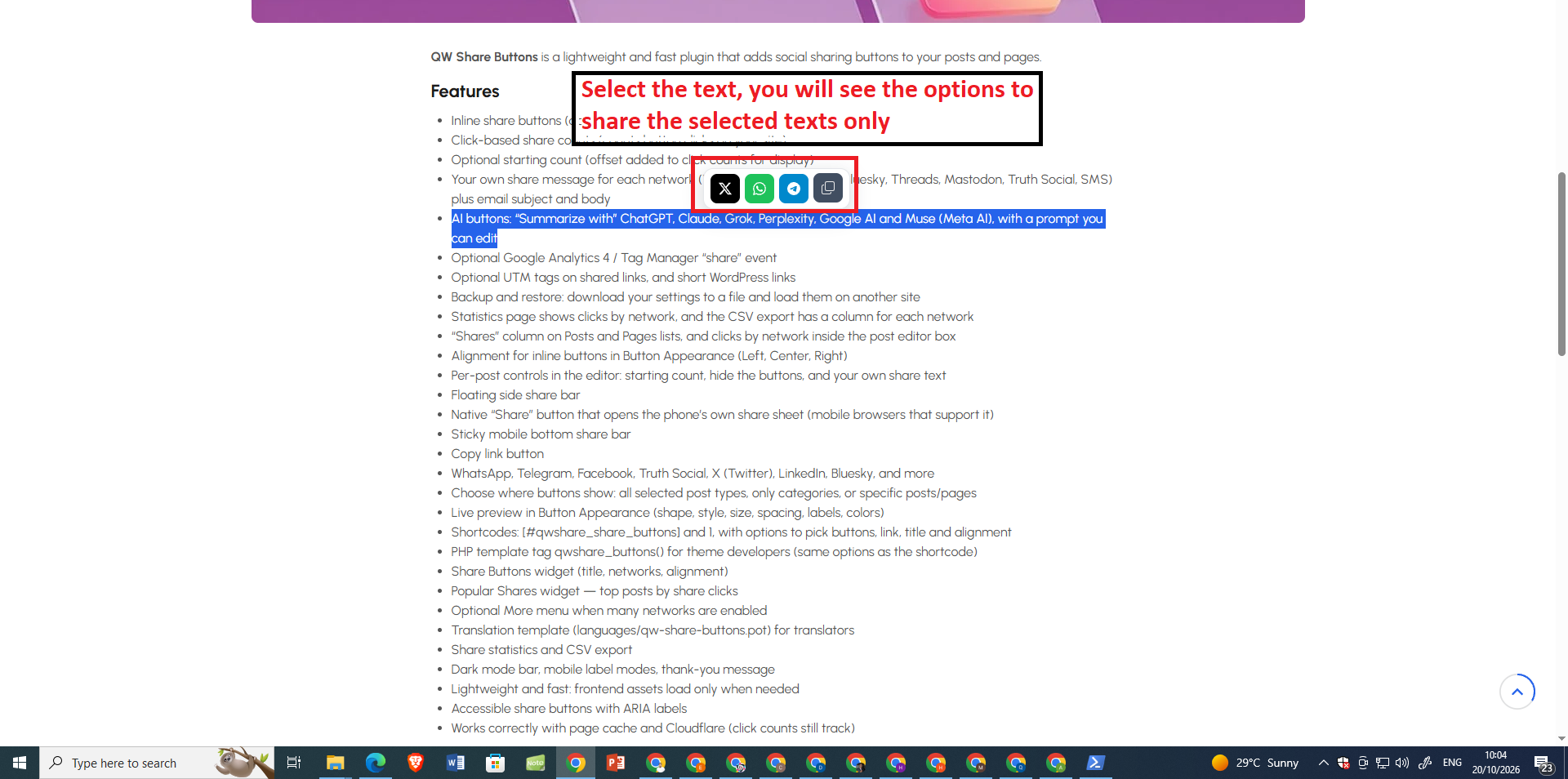
- Text selection and Click-to-Tweet — let readers share a highlighted quote or a prepared message.
- WooCommerce placements — choose sharing positions on product pages; optional BuddyPress and bbPress sharing is also available.
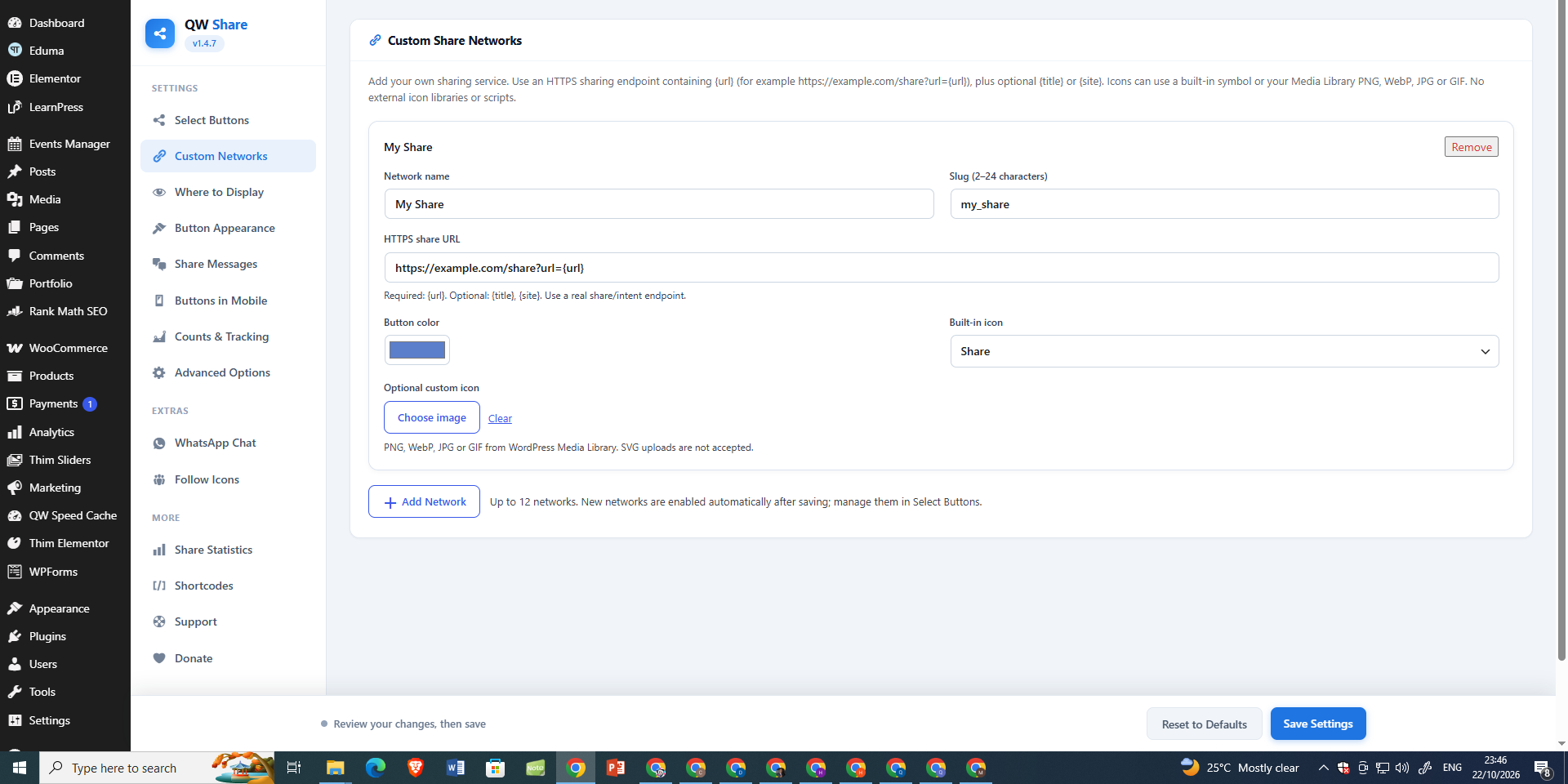
- Custom networks, UTM links and short links — extend available destinations and tailor shared URLs.
- Follow Icons and optional WhatsApp Chat — complementary tools that can be enabled independently.
Popular sharing destinations
Choose from WhatsApp, Telegram, Facebook, X, LinkedIn, Pinterest, Reddit, Bluesky, Threads, Viber, Naver BAND and many others. Share to AI supports ChatGPT, Claude, Grok, Perplexity, Google AI and Meta AI (Muse). Some destinations depend on browser support or an installed mobile app.
Get started: Open Select Buttons to choose destinations, Where to Display for placements, Button Appearance for styling, and Share Statistics to see click activity. Optional features remain configurable in their own settings.
Main features
Sharing
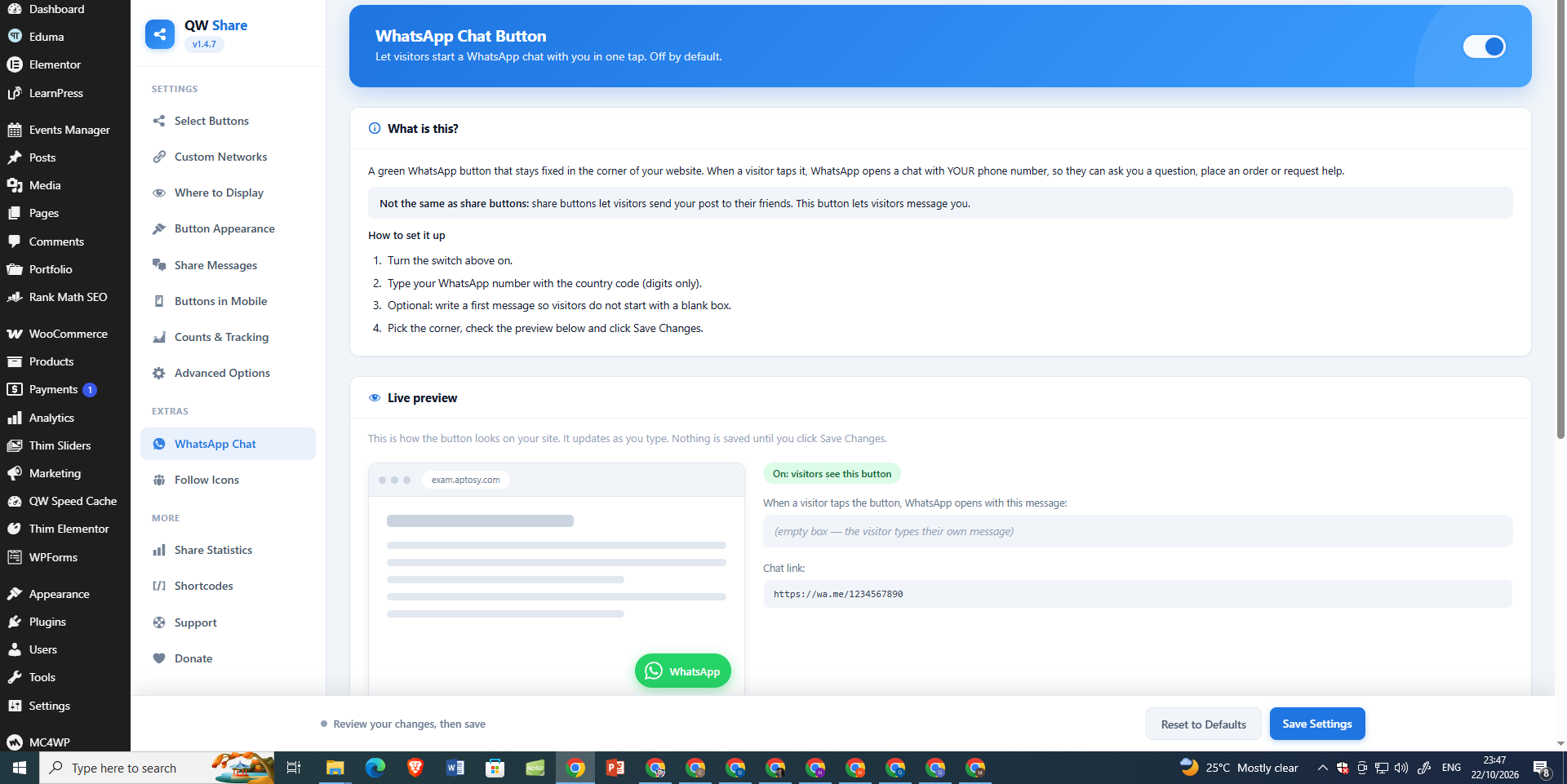
* WhatsApp click-to-chat — fixed wa.me button with your number and optional message (own WhatsApp Chat page with live preview)
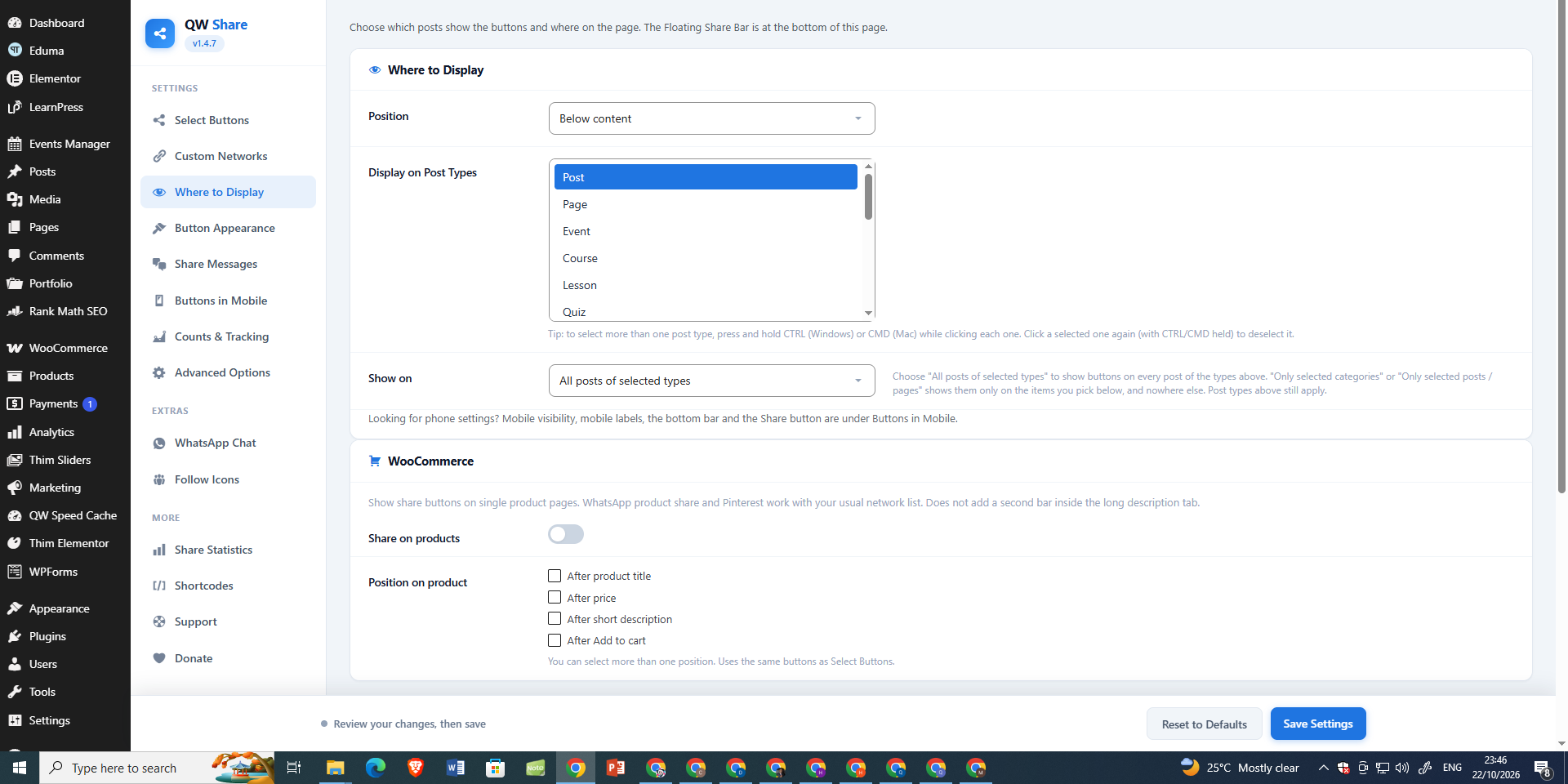
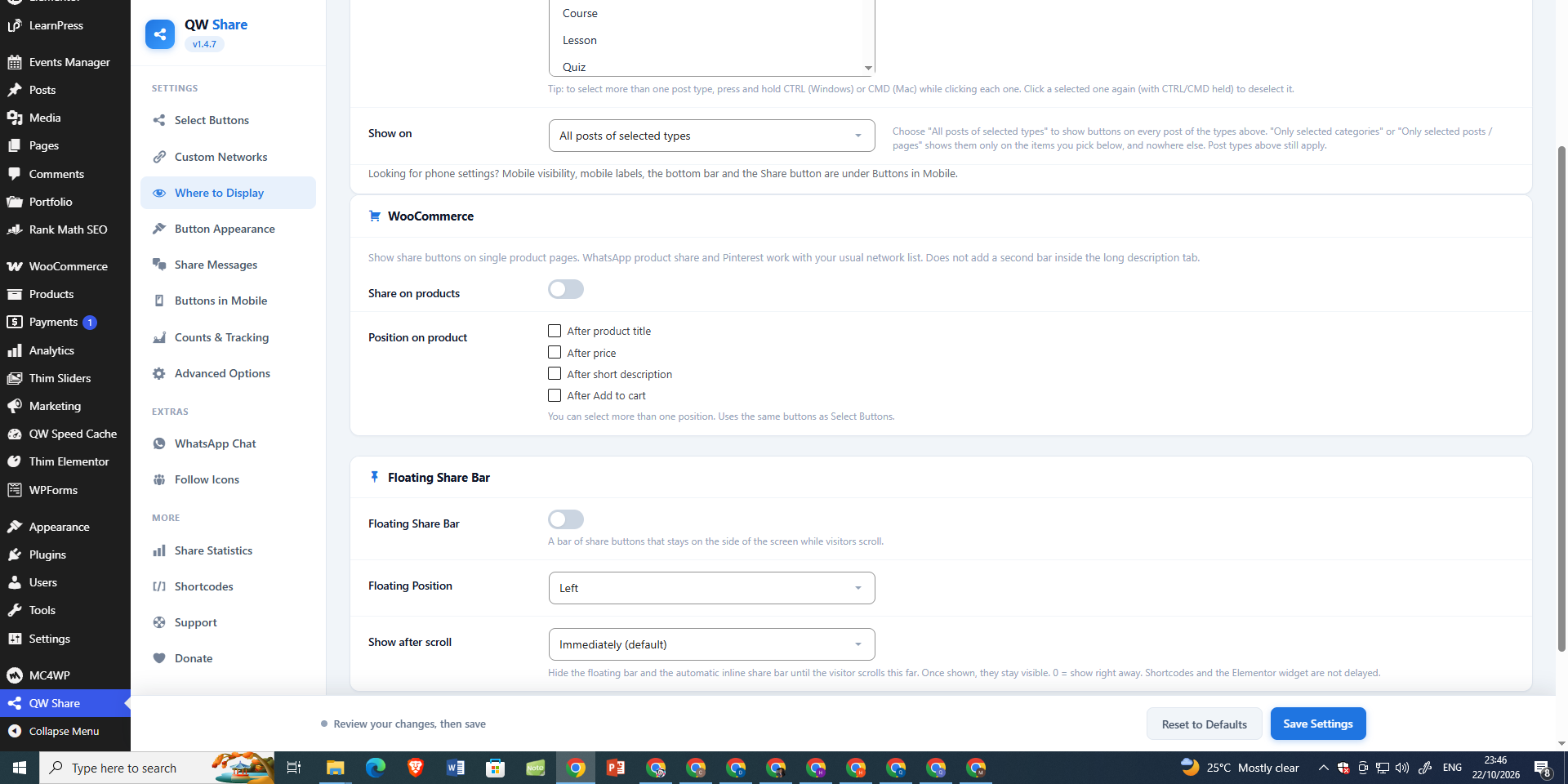
* WooCommerce product positions — after title, price, short description, or Add to cart
* Inline share buttons — above, below, both, or after the first paragraph
* Floating side bar and mobile bottom bar
* Show after scroll — reveal floating/inline bars after 25%, 50%, or 75% of the page
* Native device Share button on supported mobile and desktop browsers (HTTPS required); configure its device visibility
* Copy link, Email, SMS, Print and 25+ networks
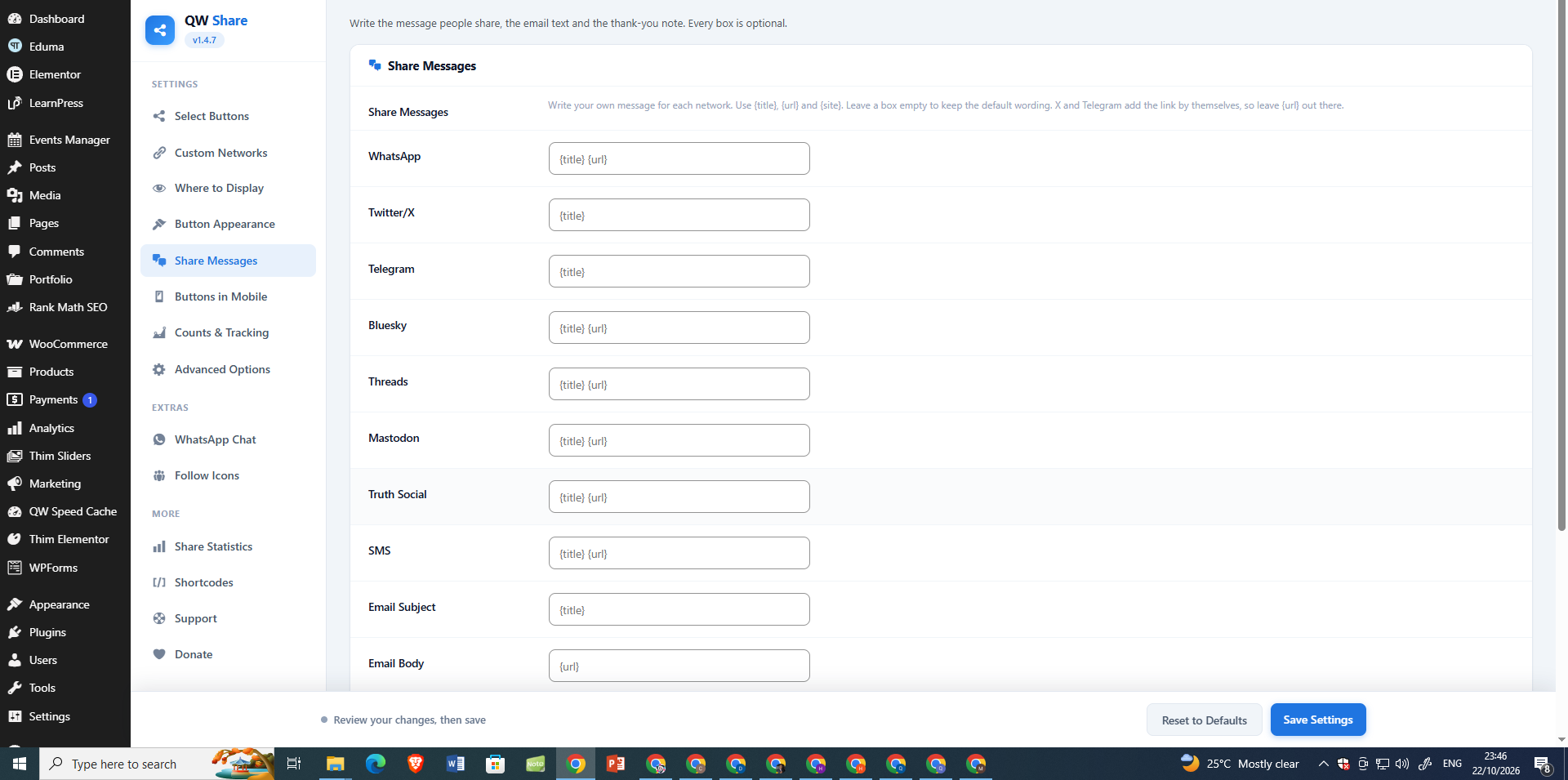
* Custom share messages per network ({title}, {url}, {site})
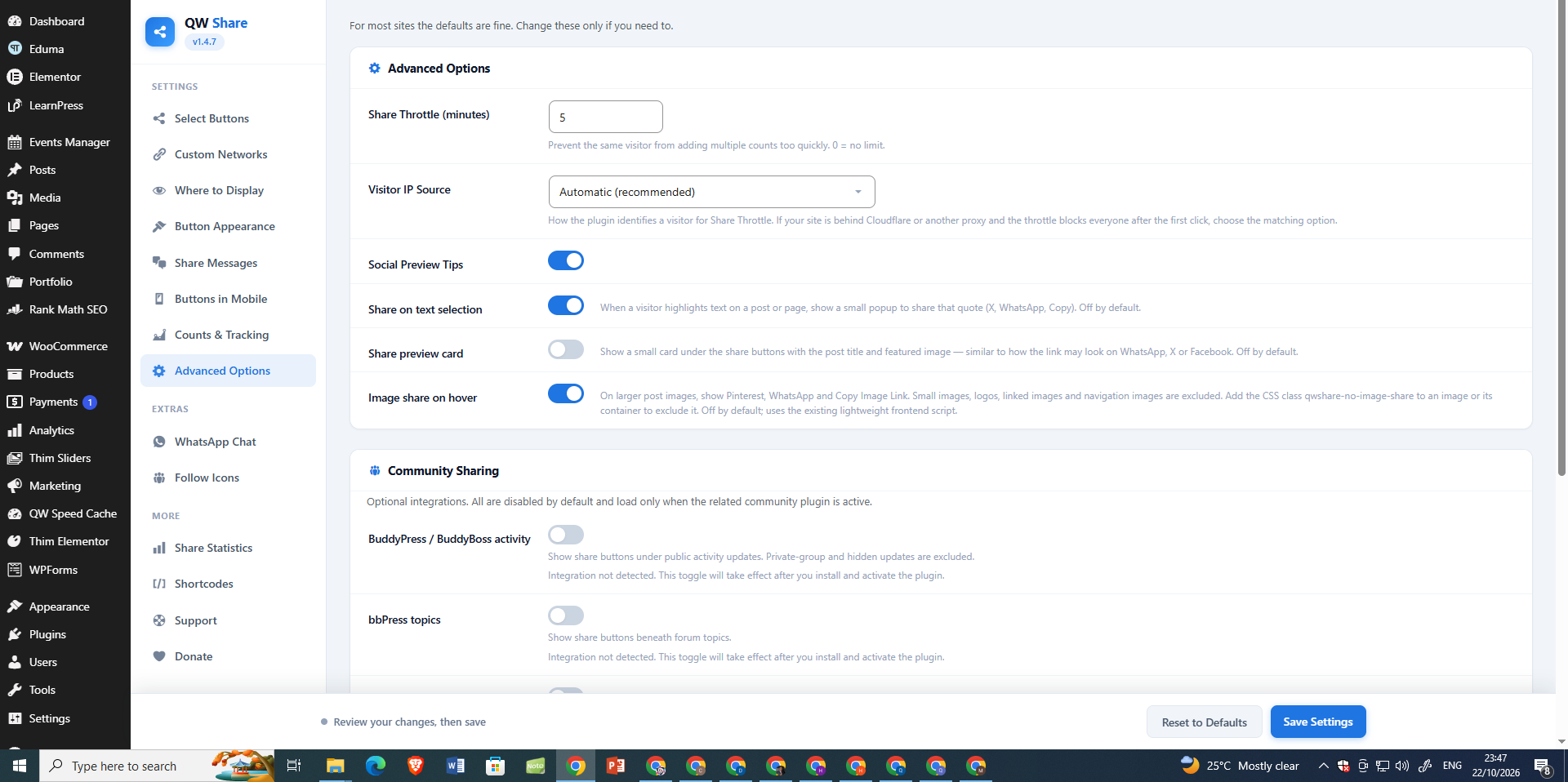
* Share preview card (title + featured image under the bar)
* Share on text selection popup (X, WhatsApp, Telegram, Copy)
* Image share on hover — one compact Share menu with Pinterest, WhatsApp, Facebook, X, Telegram, LinkedIn, Email, and Copy Link (off by default)
* More menu — manually select networks for the menu or automatically move extra networks inside it
* Optional UTM tags and WordPress short links on shared URLs
* Optional Google Analytics 4 / Tag Manager “share” event
* Optional After-Share Action panel with editable heading, message, and follow/CTA link
* Optional BuddyPress activity and bbPress topic/reply sharing
Follow / social media icons
* Profile links for Facebook, X, Instagram, YouTube, LinkedIn, Telegram, Pinterest, Threads
* Shortcode [qwshare_follow] and QW Follow Icons widget
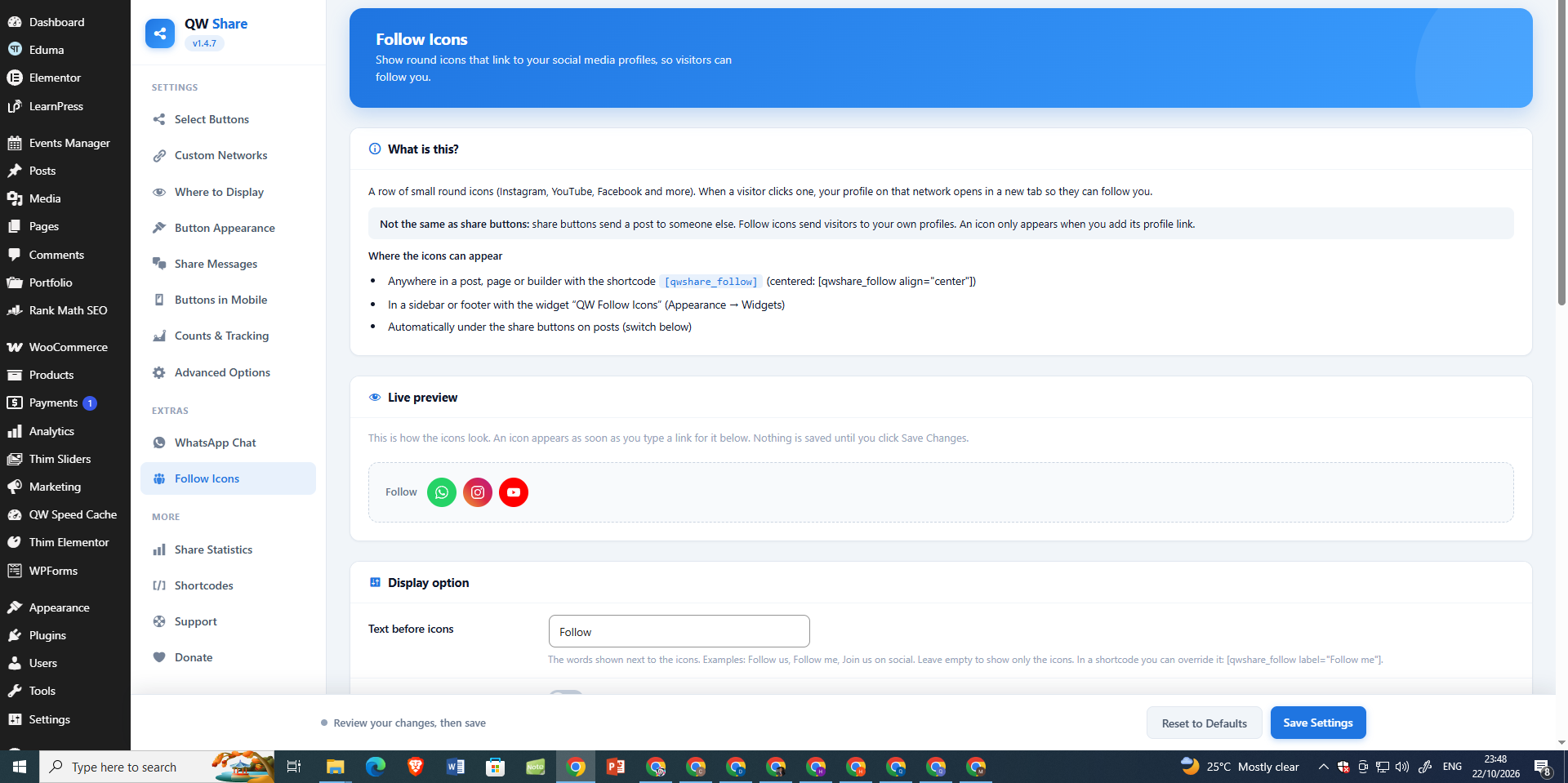
* Own Follow Icons page with a plain-language guide, live preview, and size / shape / color options
* Optional display under the automatic share bar
Counts & statistics
* Click-based counts (not third-party APIs)
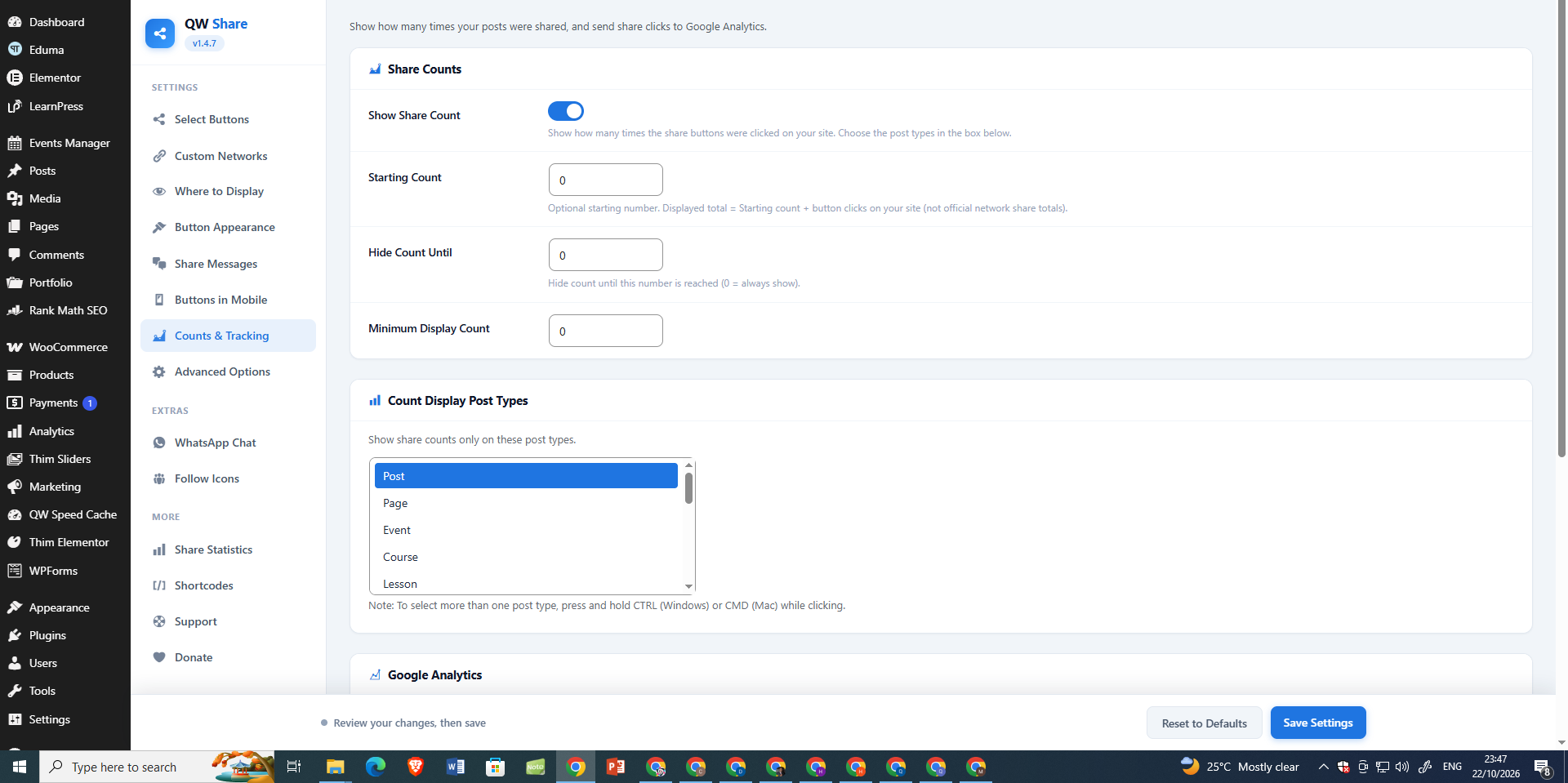
* Optional starting count (global or per post)
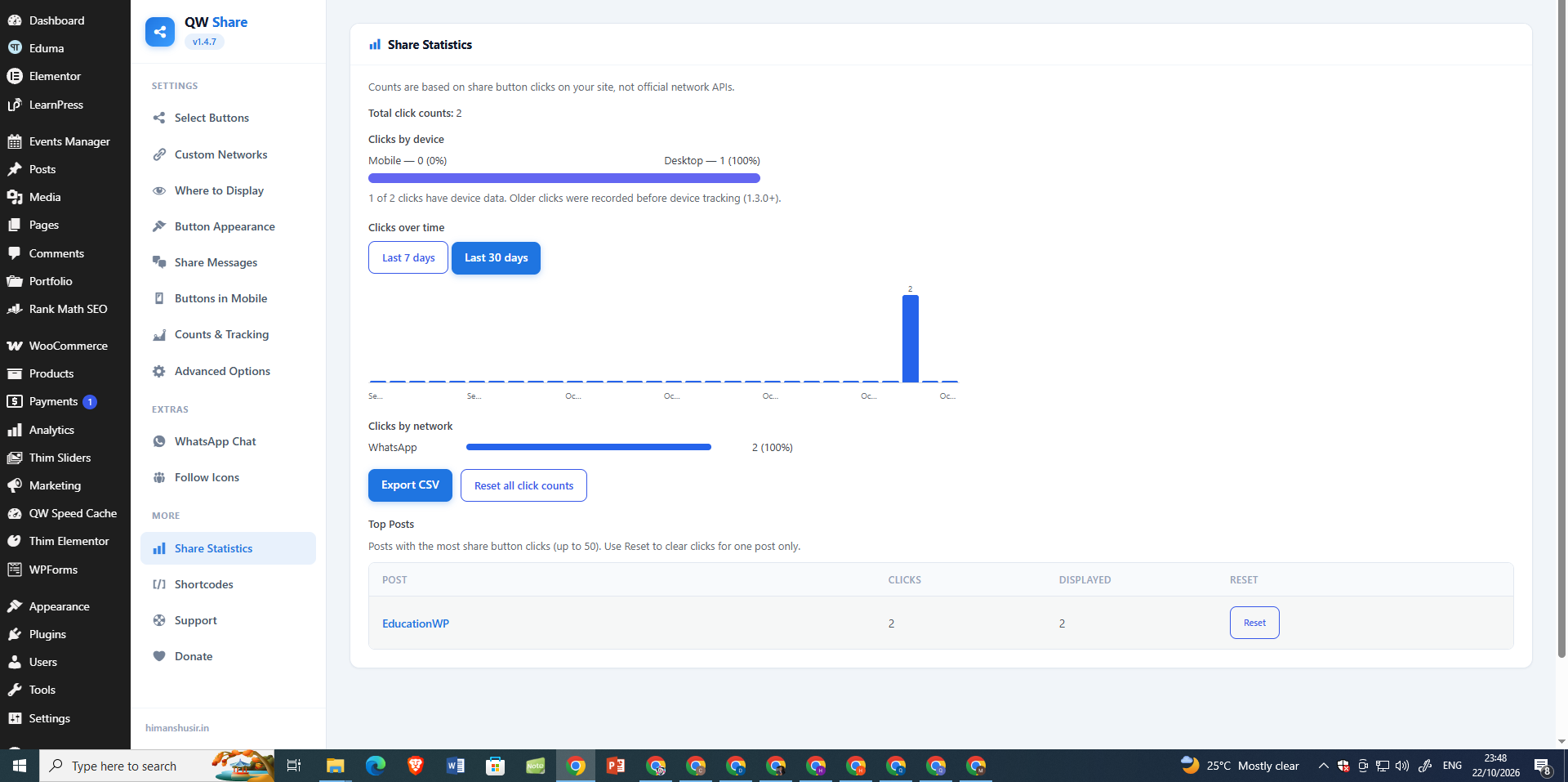
* Share Statistics — totals, clicks over time, by network, by device
* Top posts list with per-post Reset
* CSV export
* Weekly overview in Share Statistics, WordPress Dashboard widget, and optional weekly email digest
* “Shares” column on Posts / Pages lists
Placement & design
* Post types, categories, or specific posts
* Button shape, style, size, spacing, labels, colours, alignment — with live preview
* Per-network device visibility: desktop only, mobile only, or both
* Responsive container maximum width, optional background/border, and customizable background color
* Independent mobile alignment options for inline sharing
* Dark mode option
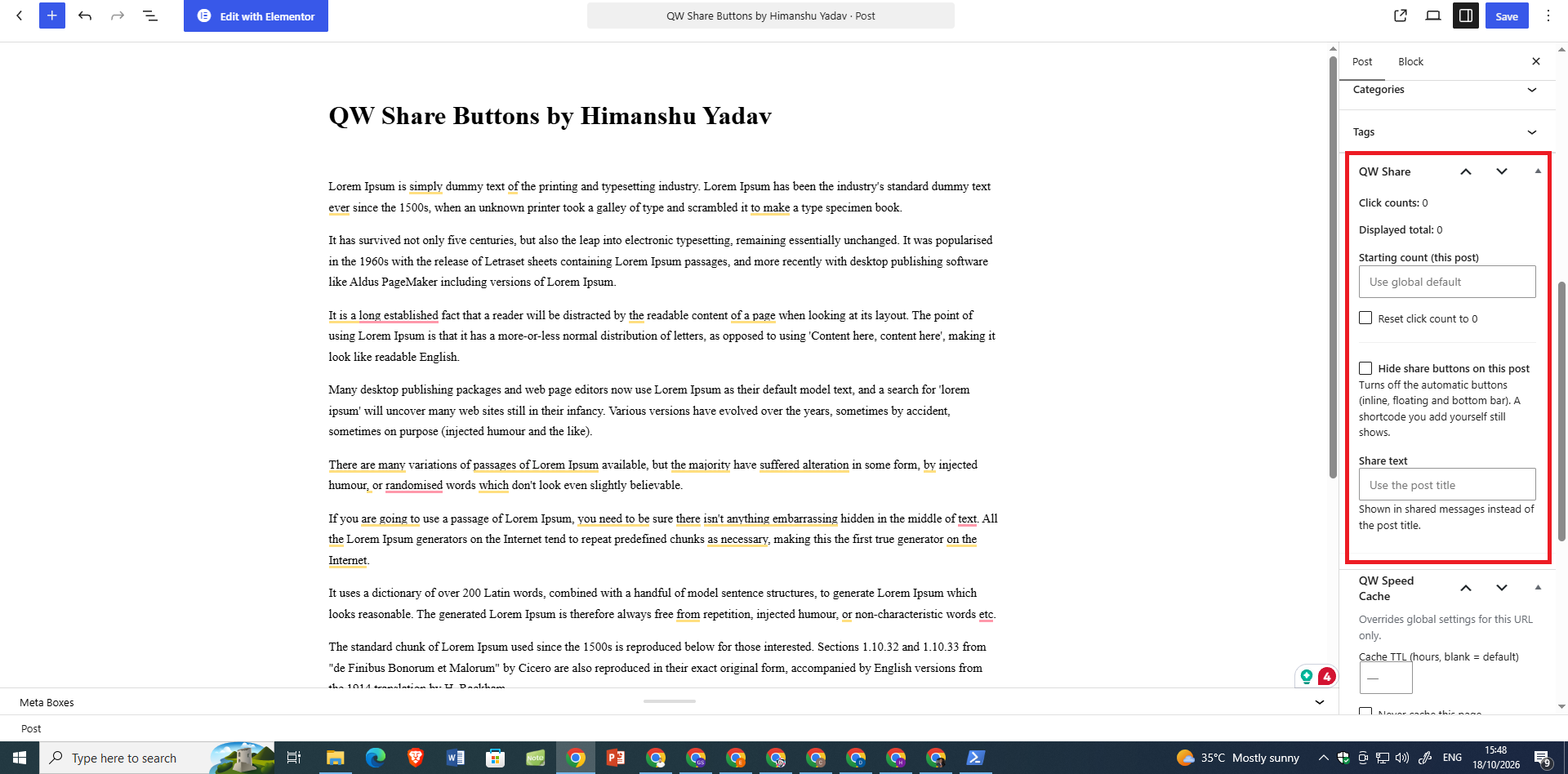
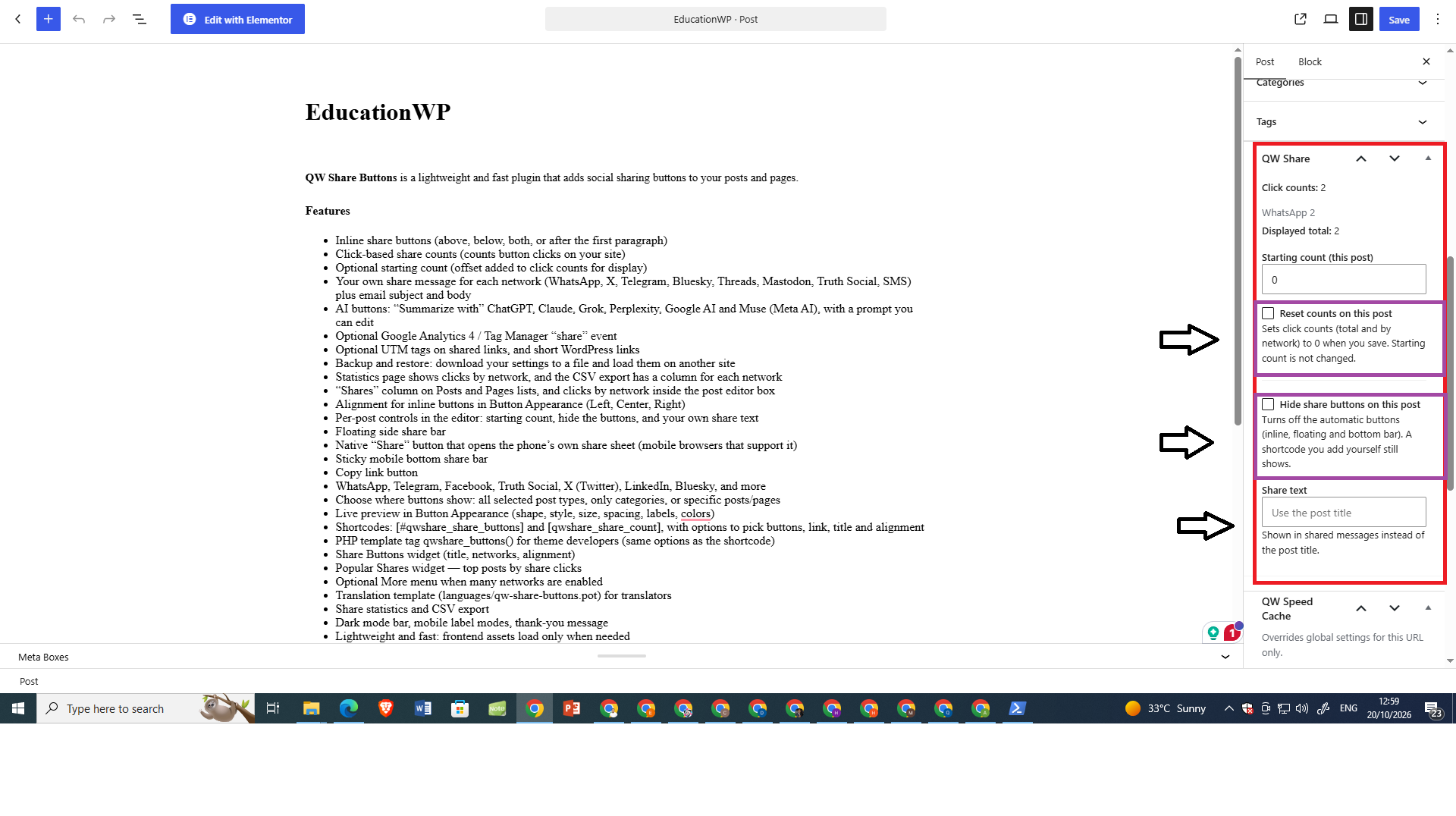
* Per-post controls: hide buttons, starting count, custom share text, reset counts
* Gutenberg block with live preview
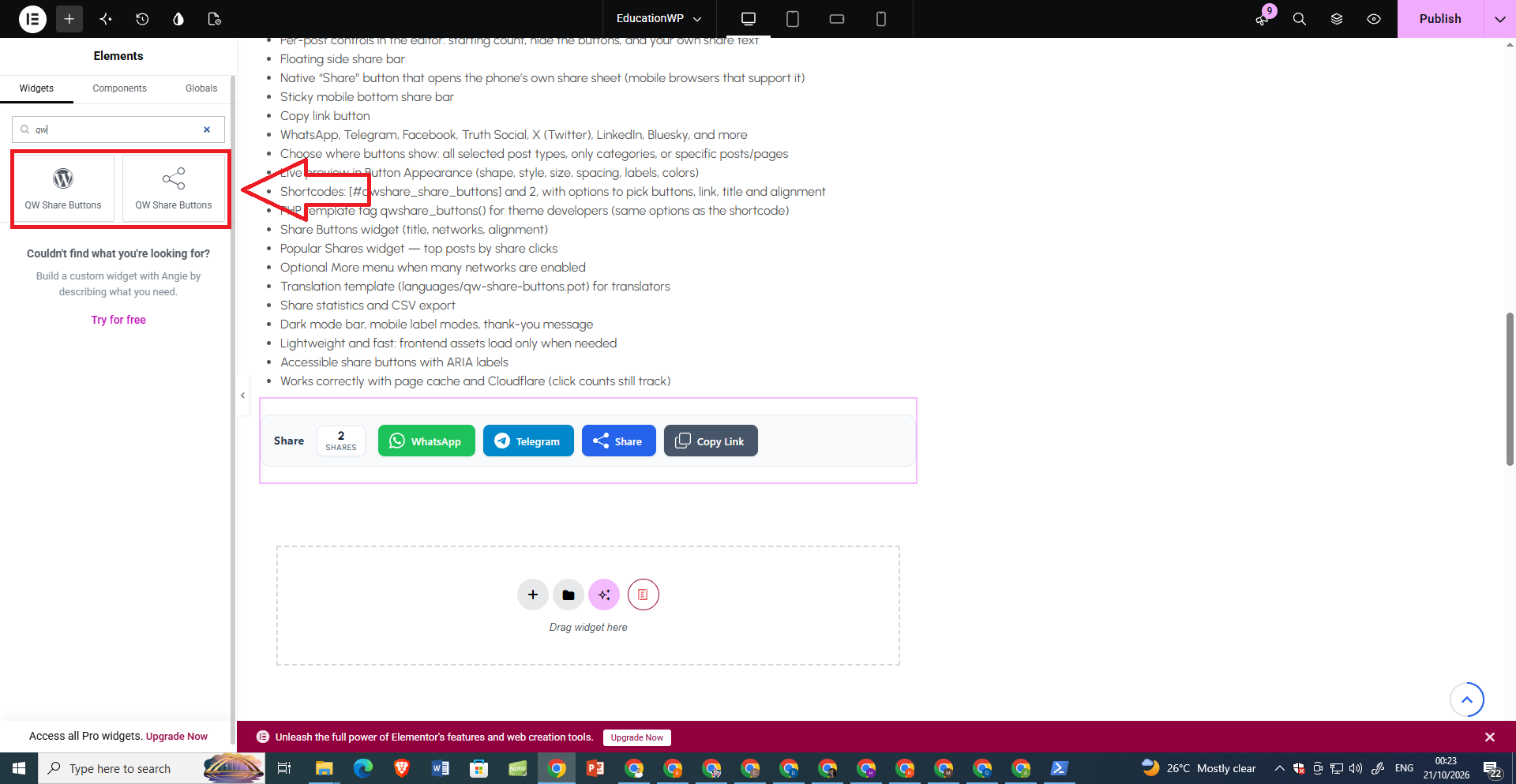
* Elementor widget — networks, alignment, post/product ID, custom URL and title
* Shortcodes [qwshare_share_buttons] and [qwshare_share_count]
* Template tag qwshare_buttons() for themes
* Share Buttons widget and Popular Shares widget
Privacy & performance
* No official Facebook/X share-count APIs
* No background calls to social networks
* Frontend assets load only when buttons (or optional features) are shown
* Works with page cache and Cloudflare
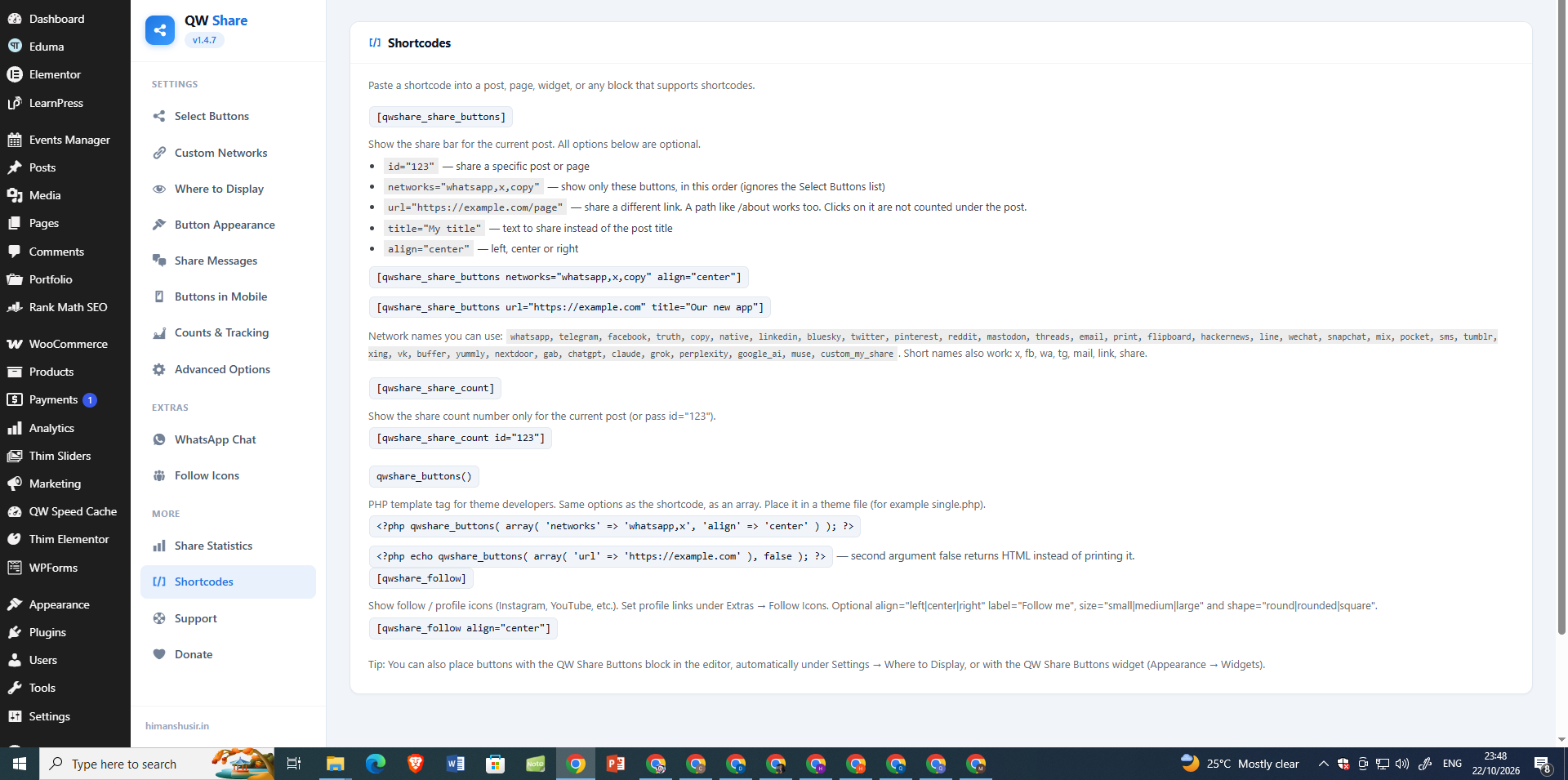
Shortcodes
[qwshare_share_buttons]— share bar (optionalnetworks,url,title,align,id)[qwshare_share_count]— share count only[qwshare_follow]— follow / profile icons (optionalalign)
Perfect for
Blogs, news sites, WooCommerce stores, education sites and publishers looking for lightweight social sharing, on-site click analytics and customizable sharing buttons in one WordPress plugin.
External services
This plugin constructs share links that open third-party social network share dialogs when a visitor clicks a share button. No data is sent automatically by the plugin server-side; the browser navigates (or opens a new tab) to the chosen network’s share endpoint with the current page URL and title.
Services used (when the corresponding network is enabled):
- WhatsApp (api.whatsapp.com) — opens WhatsApp share with pre-filled text. Terms: https://www.whatsapp.com/legal/terms-of-service Privacy: https://www.whatsapp.com/legal/privacy-policy
- Telegram (t.me) — opens Telegram share. Terms: https://telegram.org/tos Privacy: https://telegram.org/privacy
- Facebook (facebook.com) — opens Facebook sharer. Terms: https://www.facebook.com/terms Privacy: https://www.facebook.com/privacy/policy
- X / Twitter (x.com) — opens post composer. Terms: https://x.com/tos Privacy: https://x.com/privacy
- LinkedIn (linkedin.com) — opens share-offsite. Terms: https://www.linkedin.com/legal/user-agreement Privacy: https://www.linkedin.com/legal/privacy-policy
- ChatGPT (chatgpt.com) — AI button; opens ChatGPT with your prompt and the page link pre-filled. Terms: https://openai.com/policies/terms-of-use/ Privacy: https://openai.com/policies/privacy-policy/
- Claude (claude.ai) — AI button; opens Claude with your prompt and the page link pre-filled. Terms: https://www.anthropic.com/legal/consumer-terms Privacy: https://www.anthropic.com/legal/privacy
- Grok (grok.com) — AI button; opens Grok with your prompt and the page link pre-filled. Terms: https://x.ai/legal/terms-of-service Privacy: https://x.ai/legal/privacy-policy
- Perplexity (perplexity.ai) — AI button; opens Perplexity with your prompt and the page link pre-filled. Terms: https://www.perplexity.ai/hub/legal/terms-of-service Privacy: https://www.perplexity.ai/hub/legal/privacy-policy
- Google AI Mode (google.com) — AI button; opens Google AI Mode with your prompt and the page link pre-filled. Terms: https://policies.google.com/terms Privacy: https://policies.google.com/privacy
- Muse / Meta AI (meta.ai) — AI button; opens Meta AI (powered by Muse) with your prompt and the page link pre-filled. Terms: https://www.facebook.com/terms Privacy: https://www.facebook.com/privacy/policy/
The AI buttons are ordinary links. Nothing is sent until a visitor clicks one, and then only the prompt text (which includes the page link) goes to that service. - Pinterest, Reddit, Bluesky, Threads, Nextdoor, and other networks listed in the plugin settings — each opens that network’s public share/intent URL with the page URL (and sometimes title). Consult each network’s own terms and privacy policy.
No personal data is transmitted by the plugin itself beyond what the visitor’s browser sends when following a normal share link. The plugin does not register with or call network APIs in the background.
གཏུབ་རེིས།
Blocks
This plugin provides 2 blocks.
- QW Share Buttons
- QW Click to Tweet
སྒྲིག་འཇུག
- Upload the plugin folder to
/wp-content/plugins/or install the ZIP via Plugins Add New Upload. - Activate QW Share Buttons through the Plugins menu.
- Go to QWShare in the admin menu to configure networks and display options.
FAQ
-
It combines Share to AI destinations, on-site sharing-button click analytics, extensive responsive customization, scroll-aware floating bars, optional After-Share Actions, advanced Pinterest controls and manual historical count recovery. You can use the features you need without installing a separate frontend icon library. The plugin does not claim to measure completed shares or to be the fastest plugin without comparative benchmarks.
-
WeChat has no public web share link, so the button copies the page link. Paste it into WeChat to share.
-
Use the shortcode
[qwshare_share_count](optionally withid="123"). It shows the same number as the share bar and updates after a share. -
No. Counts track share button clicks on your site only. They are not pulled from social network APIs.
-
What is the starting count?
-
An optional number you can set globally or per post. It is added to click counts when showing the total. It is not a claim of external network shares.
-
Can I set a different starting count per post?
-
Yes. Edit a post and use the QW Share box in the sidebar.
-
Yes. Go to QW Share > Share Messages. Use
{title},{url}and{site}, for exampleRead this: {title} {url}. Leave a box empty to keep the default wording. X and Telegram add the link by themselves, so leave{url}out for those two. Email has its own subject and body boxes. -
ChatGPT, Claude, Grok, Perplexity, Google AI and Muse (Meta AI) buttons. When a visitor clicks one, it opens that AI site with a ready question such as “Summarize this page: (link)”. Turn them on in QW Share > Select Buttons, and change the question in QW Share > Share Messages (AI Buttons Prompt). They are off until you pick them.
-
Claude and Muse (Meta AI) do not always accept a question typed into their link, so they can open with an empty box. When one of these buttons is clicked, the plugin also copies the question to the clipboard and shows a short message, so the visitor can paste it if the box is empty.
-
How do I move my settings to another site?
-
Go to QW Share > Advanced Options > Backup & Restore. Click Download Settings File on the first site. On the second site, choose that file under Import Settings and click the button. A wrong file is rejected and nothing changes. Selected categories and posts are specific to each site.
-
Where can I see which networks are used most?
-
Go to QW Share > Share Statistics. The Clicks by network list shows your top networks. The CSV export also has one column per network.
-
In QW Share > Counts & Tracking > Link Tracking. UTM tags add
utm_source(the network),utm_mediumand an optional campaign name to the shared link, so Google Analytics shows which network sent each visit. Only links to your own site are tagged. Short links share the short WordPress link (likeyoursite.com/?p=123) instead of the long address. Both are off by default. -
Yes. Turn on Analytics Event in QW Share > Counts & Tracking. Each click sends a
shareevent withmethod(the network),content_typeanditem_id(the post ID). It usesgtagif your site has it, otherwise the Tag ManagerdataLayer. The plugin makes no requests of its own for this. -
Yes. Edit the post, open the QW Share box in the sidebar and tick Hide share buttons on this post. This turns off the automatic buttons (inline, floating and bottom bar) for that post only. A shortcode you add yourself still shows.
-
Yes. Type it in the Share text field of the QW Share box. It is used instead of the post title in shared messages, such as the X post text, the WhatsApp message and the email subject. Leave it empty to use the post title.
-
Not on the front of your site. The share buttons, counts, More menu and text-selection popup all run on plain JavaScript. Your admin screens still use the jQuery that WordPress ships. If your theme or another plugin loads jQuery, that is not affected.
-
Is it privacy-friendly / GDPR-friendly?
-
The plugin sets no cookies, uses no browser storage, loads nothing from other websites, and does not store visitor IP addresses. Click counts are anonymous totals kept in your own database. This is not legal advice: if you turn on the Google Analytics event option, that tool’s own rules apply, and share links open the network your visitor chooses. Ready-made wording for your privacy policy is under Settings Privacy Policy Guide.
-
Can I choose different sharing networks on desktop and mobile?
-
Yes. Open QW Share > Select Buttons > Desktop & Mobile Network Visibility and choose Both, Desktop, or Mobile for each network. Existing selections are preserved until you change them.
-
Does it work on mobile?
-
Yes. You can set network visibility per device, choose mobile button alignment, use icon-only labels on small screens, and optionally enable a sticky mobile bottom bar.
-
It opens the device’s native share menu through the browser’s Web Share API where supported. It can appear on phones, tablets, and supported desktop browsers when configured under Desktop & Mobile Network Visibility. It requires HTTPS and browser support; unavailable browsers do not display it.
-
Open QW Share > Select Buttons > More Share Button. Enable More, then choose Manual to select networks that appear inside the menu, or Automatic to keep a chosen number of buttons visible and group the rest. Disable More to return to the normal share buttons.
-
Yes. Under QW Share > Button Appearance, you can set a responsive maximum width, adjust alignment, choose a background color, and disable the container background or border.
-
Optional follow or call-to-action messages configured under QW Share > Share Messages. The panel can appear after interacting with a sharing link; opening a third-party share window does not confirm the visitor completed the share.
-
Where are the weekly analytics and email settings?
-
The main QW Share > Share Statistics page contains the analytics reports and weekly overview. A compact summary is also available as a WordPress Dashboard widget. Weekly email digests are optional and can be configured from Share Statistics; they reuse the plugin’s existing click-count data.
-
Does it support BuddyPress and bbPress?
-
Yes. Optional community sharing can be enabled under QW Share > Advanced Options for eligible public BuddyPress activity, bbPress topics, and replies. These features are disabled by default and require the relevant community plugin.
-
What is the mobile bottom bar?
-
A slim share bar fixed to the bottom of the screen on phones and small tablets. Turn it on under Settings > Mobile Bottom Bar. It uses the first networks from your Select Buttons list and can add the Share button.
-
Yes. Add
networksto the shortcode, for example[qwshare_share_buttons networks="whatsapp,telegram,copy"]. The buttons appear in the order you type them. You can usexfor X (Twitter),fbfor Facebook,wafor WhatsApp,tgfor Telegram,mailfor Email,linkfor Copy Link andsharefor the phone Share button. The full list of names is on the Shortcodes page in QW Share. -
Yes. Use
url, for example[qwshare_share_buttons url="https://example.com" title="Our new app"]. Clicks on a custom link are not added to the post’s share count. -
Use the shortcode
[qwshare_share_buttons]in content, widgets (if shortcodes are enabled), or a block that supports shortcodes. -
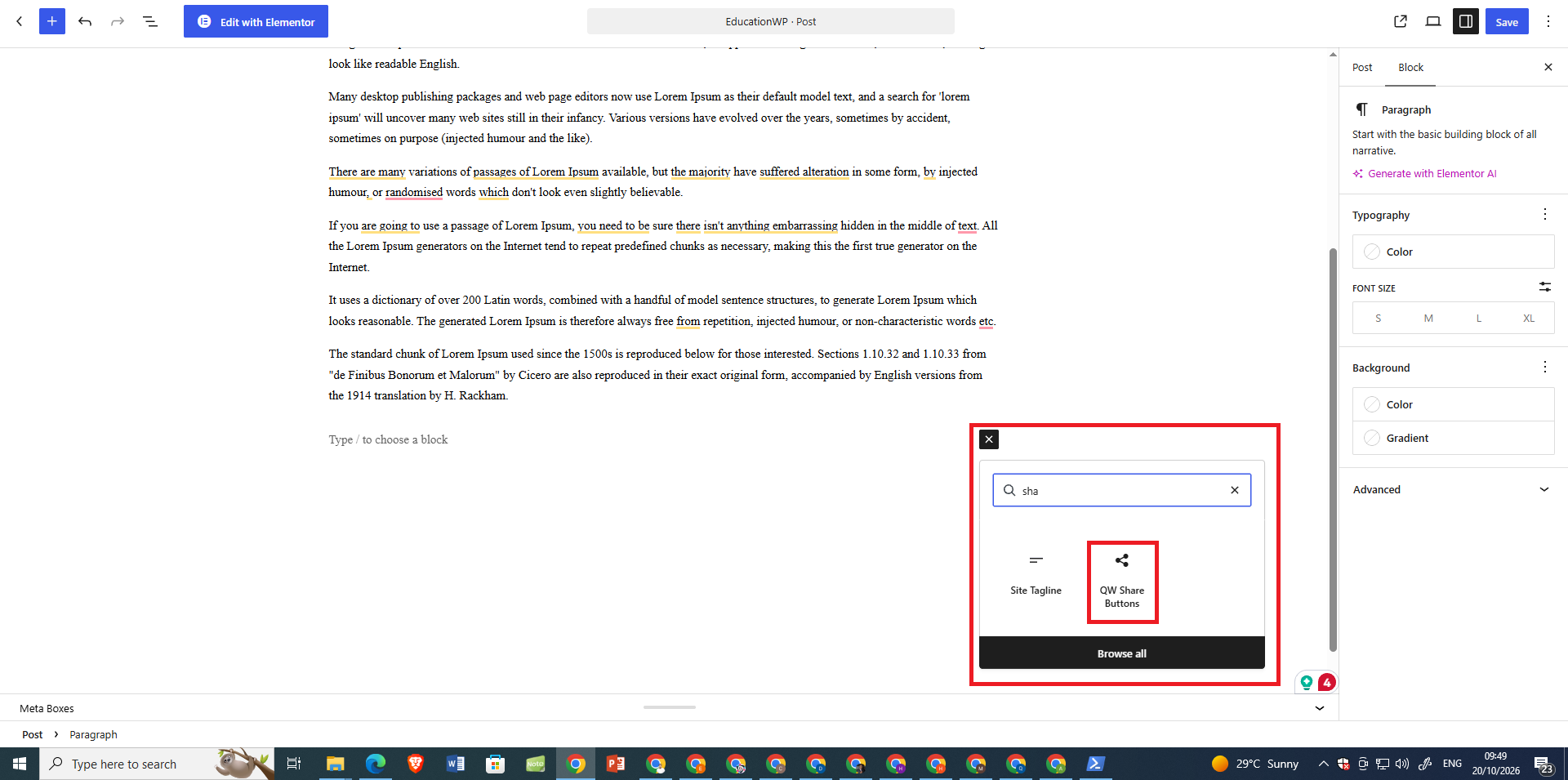
In the post or page editor, click Add block and search for QW Share Buttons. You can pick networks and alignment in the sidebar. The preview updates as you change options.
-
Go to QW Share Advanced Options and enable Share on text selection. Save. When a visitor highlights text on a post or page, a small popup offers X, WhatsApp, Telegram and Copy. It is off until you enable it.
-
Where can I see clicks over the last 7 or 30 days?
-
Open QW Share Share Statistics. Use the Last 7 days or Last 30 days buttons above the chart. Daily data is collected from version 1.2.9 onward.
-
Does this plugin slow down my site?
-
No. Frontend CSS and JavaScript load only when share buttons (or the text-selection feature) are actually shown. Counts work with page cache and Cloudflare.
གདེང་འཇོག

བྱས་རྗེས་འཇོག་མཁན། & གསར་འབྱེད་པ།
“QW Share Buttons” is open source software. The following people have contributed to this plugin.
བྱས་རྗེས་འཇོག་མཁན།
ཁྱེད་ཀྱི་སྐད་ཡིག་ནང་ལ་ “QW Share Buttons” ཡིག་སྒྱུར་བྱོས།
Interested in development?
Browse the code, check out the SVN repository, or subscribe to the development log by RSS.
དག་བཅོས་ཉིན་ཐོ།
1.6.6
- Add live Gutenberg sharing-button customization with instant previews for networks, styles, shapes, colors, and alignment.
- Improve the dedicated QW Share editor sidebar with consistent spacing and streamlined post-specific controls.
1.6.5
- Add a dedicated QW Share editor sidebar with a labeled toolbar button. [Organize post-specific network, display, count, and Pinterest controls directly in the WordPress editor.]
1.6.4
- Add per-post network selection for automatic inline, floating, mobile, and default shortcode buttons while preserving global defaults and explicit shortcode choices.
1.6.3
- Reduce basic-sharing frontend asset sizes with conditional CSS and JavaScript loading. [Core CSS: 10.2 KB to 8.35 KB; core JS: 9.45 KB to 6.21 KB (gzip file comparisons). Optional features retain their separate assets when enabled.]
- Improve scroll handling and avoid unnecessary settings and Pinterest metadata processing.
1.6.2
- Improve plugin discovery and feature documentation. [Highlight lightweight sharing, Share to AI, built-in click analytics, customization, After-Share Actions, and Pinterest tools.]
1.6.1
- Add switchable settings tabs under Where to Display and Advanced Options. [Organize existing controls into compact sections while preserving saved settings and frontend performance.]
1.6.0
- Improve scroll-triggered sharing controls and frontend efficiency. [Set independent floating and automatic inline bar thresholds, with optimized scroll checks and no additional dependencies.]
- Add collapsible Floating Share Bar settings under Where to Display. [Keep floating options together without adding another sidebar menu.]
1.5.9
- Improve sharing-button tooltips and appearance settings. [Show network names on hover, preserve custom colors across presets, and prevent the Select Buttons panel briefly appearing when opening other settings pages.]
- Improve Naver BAND icon. [Update the icon to match the official BAND logo more accurately.]
1.5.8
- Add admin-only Performance Diagnostics. [View local frontend and admin asset sizes, loading behavior, and sharing configuration without extra frontend scripts or requests.]
1.5.7
- Add Disable All Sharing Buttons under Select Buttons. [Control automatic and manually inserted sharing buttons, including shortcodes, Elementor widgets, and floating bars, from one place.]
- Improve sharing settings usability. [Add a compact dual-toggle header, improve post/page selection including drafts, add hover tooltips, and simplify cache guidance.]
1.5.6
- Add lightweight Viber and Naver BAND sharing buttons under Select Buttons. [Use official sharing destinations without external SDKs or additional frontend dependencies. Viber requires its mobile app.]
1.5.5
- Fix Elementor shortcode editor layout issues. [Prevent oversized sharing buttons when switching to the Style tab in Elementor, while preserving the published page layout.]
1.5.4
- Add Advanced Pinterest Image Sharing under Image Share on Hover and the QW Share post editor panel. [Choose eligible images, minimum width, Pin descriptions, and optional custom Pin images while respecting Pinterest exclusion attributes.]
1.5.3
- Add Historical Share Count Recovery under the QW Share panel in the post editor. [Manually restore verified historical share counts and save previous post URLs without affecting existing sharing statistics. Find guidance under QW Share Buttons Counts & Tracking.]
1.5.2
- Add optimized production stylesheets. [Load smaller CSS files while preserving all sharing features and editable stylesheet sources.]
1.5.1
- Add per-network desktop and mobile visibility controls under Select Buttons. [Choose which social sharing networks appear on desktop, mobile, or both.]
- Improve Network Visibility and More Share Button settings UI. [Added compact, collapsible panels with polished Customize buttons, improved alignment, and easier Manual/Automatic network selection.]
1.5.0
- Improve responsive share alignment with centered custom-width containers and independent mobile alignment controls.
1.4.9
- Add a WordPress dashboard share-analytics widget, weekly summary in Share Statistics, and optional weekly email digest.
1.4.8
- Add customizable After-Share Actions and fix the follow/CTA panel for external sharing links.
1.4.7
- Fix LinkedIn icons, button alignment, hover colors and Minimal style compatibility.
- Add customizable share container width, background color and border controls.
- Improve More button with network selection, display limits and a redesigned dropdown.
- Improve Custom Network Builder validation, icons and settings handling.
- Improve Elementor-friendly responsive layouts without new frontend dependencies.
1.4.6
- Add optional BuddyPress public activity sharing and bbPress topic/reply sharing.
- Reuse existing buttons and styles without new frontend dependencies; disabled by default.
1.4.5
- Add Custom Share Network Builder with secure HTTPS URL templates, editable labels, colors, bundled icons and Media Library image icons.
- Integrate custom networks with existing share buttons, ordering and click tracking without new frontend dependencies.
1.4.4
- Add a single image Share button with a compact social sharing menu.
- Add Pinterest, WhatsApp, Facebook, X, Telegram, LinkedIn, Email and Copy Link sharing.
- Improve image-share compatibility, copy feedback and frontend cache busting.
- Keep the feature lightweight with vanilla JavaScript and no external dependencies.
1.4.3
- Fix: Style preset previews now show all three network icons fully inside each card, including the Pill preset.
- Improve: Preset gallery sizing adapts to narrow WordPress admin screens without clipping the icons.
- No changes to existing saved settings, frontend share buttons, or Click to Tweet behavior.
1.4.2
- Add Gutenberg Click to Tweet quote-card block with quote, optional attribution, and a post-linked X share action.
- Preserve existing share buttons and text-selection sharing behavior.
1.4.1
- New: Style presets. On the Button Appearance page, pick a ready-made look in one click: Classic, Minimal, Dark, Pill, Outline or Gradient. Each card shows a small preview. A preset fills in shape, style, spacing, colors and the dark bar, and the live preview updates. Your labels and button size are not changed, and nothing is saved until you click Save Settings. The card of the look you are using is highlighted.
- New: Gradient button style (also in the Button Style list): soft light-to-dark shading on top of your network colors or your custom color.
- Improved: The Button Appearance preview now shows the Dark Mode Bar setting.
- Fix: In the preset gallery, the Pill preview no longer sticks out of its card.
1.4.0
- Improved: No jQuery on the front of your site. The frontend script was rewritten in plain JavaScript (share clicks, counts, More menu, share on text selection). The script no longer depends on jQuery, so pages where nothing else uses it skip that download. Behavior is unchanged.
- New: Privacy policy text. Suggested wording for your privacy policy is now available under Settings Privacy Policy Guide.
- New: Privacy & speed card on the Support page, with a button to the privacy policy text.
- New: Privacy and speed details added to the readme description and FAQ.
- Fix: The share count in the floating bar stays hidden as styled after a click, instead of appearing.
1.3.9
- New: Follow icon styles. On Extras Follow Icons choose the icon size (small, medium, large), shape (round, rounded square, square) and colors (each network’s brand color, or one color for all icons). The live preview updates as you choose. The shortcode also accepts size and shape, e.g. [qwshare_follow size=”large” shape=”square”]. Defaults match the old look, so existing sites do not change.
1.3.8
- New: WhatsApp Chat page. The WhatsApp click-to-chat button now has its own menu item (QW Share Extras WhatsApp Chat) instead of sitting inside Advanced Options. The page explains what the button does in plain words, shows a live preview of the button on a sample page (it updates as you type your number, message and corner), and lists the setup steps.
- New: Follow Icons page. Follow / Profile icons now have their own menu item (QW Share Extras Follow Icons) with a short explanation, where the icons can appear (shortcode, widget, under the share bar) and a live preview that shows each icon as soon as you type its profile link.
- New: Editable text labels. Change the words on the WhatsApp button (for example “Chat with us” or “Ask a question”) and the text before the follow icons (for example “Follow us” or “Follow me”). Leave a box empty to show only icons. The shortcode also accepts label=”…”, e.g. [qwshare_follow label=”Follow me”].
- Improved: The WhatsApp number box warns you when the number looks too short, instead of silently keeping the button hidden.
- Fix: Description text under card titles touched the card border in the WhatsApp, Follow and WooCommerce settings. It now has the same side padding as the rest of the card.
- Fix: The WhatsApp profile link in Follow icons could be typed but was never saved. It is now saved and shows in the follow bar.
- Fix: The Shortcodes help page said follow icon links are set under Advanced Options. It now points to the Follow Icons page and shows the label option.
- Fix: The YouTube follow icon was drawn with a damaged outline (lumpy corner). Replaced with a clean icon.
1.3.7
- New: WhatsApp click-to-chat. Fixed floating button that opens a chat with your number via wa.me (Advanced Options). Optional pre-filled message and left/right position. Hidden on WooCommerce cart and checkout. Off by default.
1.3.6
- New: Show after scroll. Optionally hide the floating bar and automatic inline share bar until the visitor scrolls 25%, 50%, or 75% of the page (Where to Display Floating Share Bar). Once shown, they stay visible. Off by default (show immediately).
1.3.5
- New: Elementor widget — QW Share Buttons. Drag share buttons into any Elementor layout. Choose networks, alignment, optional post/product ID, custom URL and title (same options as the shortcode and Gutenberg block).
1.3.4
- New: WooCommerce share positions. Place share buttons on product pages after the title, price, short description, or Add to cart (Where to Display WooCommerce). Off by default. Uses your usual networks (WhatsApp product share, etc.) without a duplicate bar in the long description.
1.3.3
- New: Follow / Profile icons. Link to your Instagram, YouTube, Facebook, X, LinkedIn, Telegram, Pinterest and Threads pages. Shortcode [qwshare_follow], widget “QW Follow Icons”, and optional display under the share bar. Set URLs under Advanced Options.
- New: Image share on hover. Optional Pinterest, WhatsApp and Copy controls on post images (off by default). Small script loads only when enabled.
1.3.2
- Fixed: Share Statistics device mismatch. When total clicks are higher than mobile+desktop, a short note explains that older clicks were recorded before device tracking (1.3.0+). Percentages still use only clicks that have device data.
- New: Reset on Top Posts. On Share Statistics, each row has a Reset button to clear click counts for that post only (confirm dialog). Same data as the editor box option — total and by network for that post.
- Fixed: Reset column visible. Top Posts table widths updated so Post, Clicks, Displayed, and Reset all show without being clipped off-screen.
1.3.1
- Improved: Reset counts on this post. In the QW Share editor box, check “Reset counts on this post” and save. Click counts for that post (total and by network) go back to 0. Starting count is left alone. Uses the existing post-meta only – no new tables, options, or frontend scripts.
1.3.0
- New: Share preview card. Optional card under the share buttons showing the post title and featured image — similar to how the link may look when shared on WhatsApp, X or Facebook. Off by default (Advanced Options).
- New: Clicks by device on Share Statistics. See how many clicks come from mobile vs desktop (tracked from this version onward).
1.2.9
- New: Gutenberg block — QW Share Buttons. Add share buttons in the block editor. Choose which networks to show and how to align them. The editor shows a live preview, same options as the shortcode.
- New: Clicks over time on the Share Statistics page. See a simple chart for the last 7 or 30 days, plus a clearer Top Posts list. Daily click totals start from this version.
- New: Share on text selection (“Share this quote”). When a visitor highlights text on a post or page, a small popup appears with X, WhatsApp, Telegram and Copy so they can share that quote. Off by default — turn it on under Advanced Options.
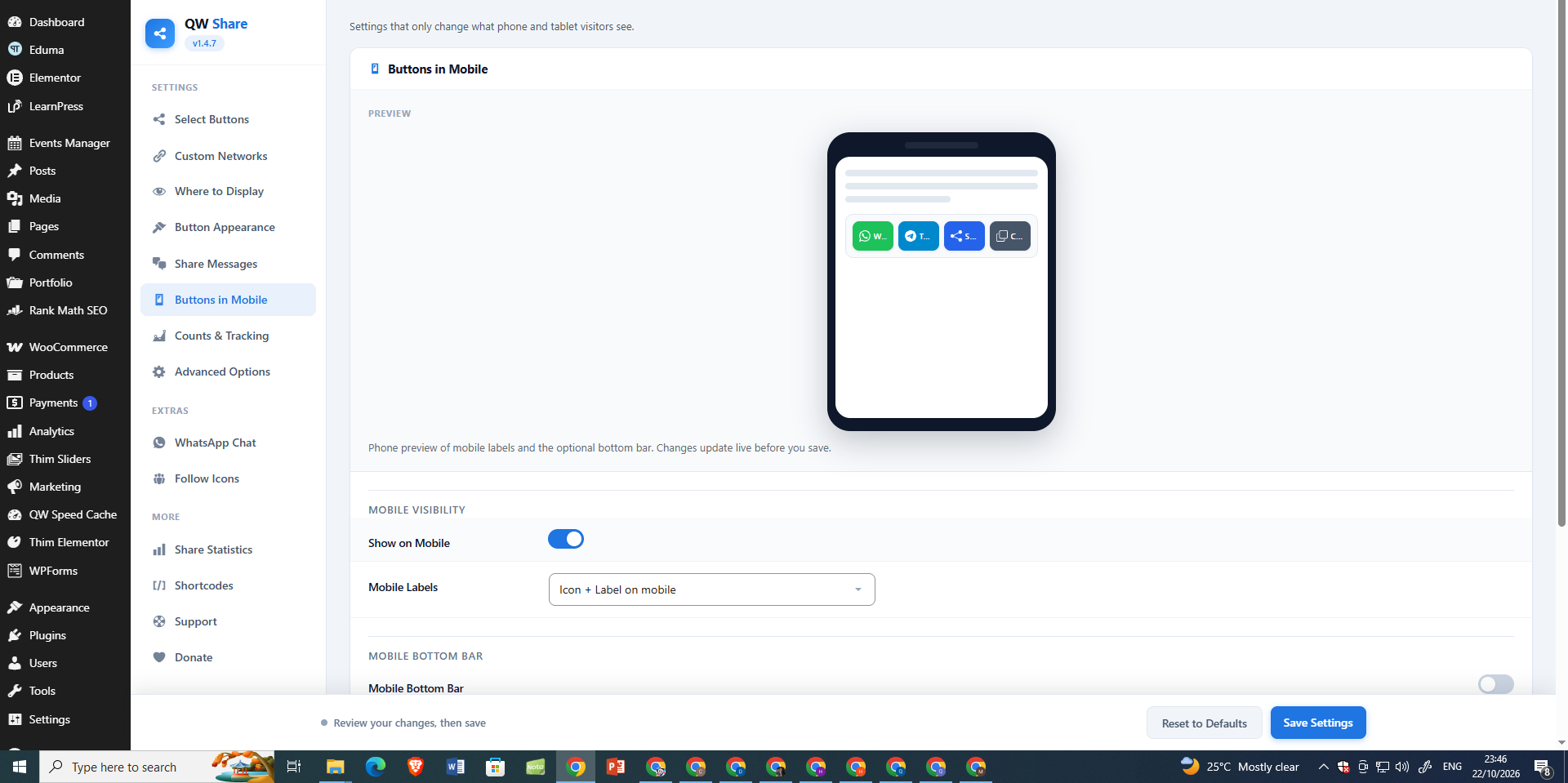
- New: Live phone preview on Buttons in Mobile. See how mobile labels and the optional bottom bar look before you save. The preview updates as you change settings.
- Improved: Clearer share button icons in the bar and in the Button Appearance preview so the admin preview matches the front of your site.
1.2.8
- New: “QW Popular Shares” widget lists posts with the most share clicks (uses existing counts). Options: title, number of posts, post type, show count.
1.2.7
- Fixed: The Button Appearance settings page showed an empty grey panel in 1.2.6. The new “More button” switch was missing its style, so it stretched over the whole page. It now looks and works like the other switches. Your saved settings are not changed.
1.2.6
- New: Share Buttons widget under Appearance Widgets (optional title, networks list, alignment).
- New: Optional More overflow in Button Appearance — show the first N networks and put the rest under a More menu (inline bars and widget).
1.2.5
- New: Template tag qwshare_buttons() for theme developers. Same options as the shortcode (networks, align, url, title, id). Documented on the Shortcodes page.
- New: languages/qw-share-buttons.pot so translators can start work without extracting strings themselves.
1.2.4
- New: Alignment setting in Button Appearance (Theme default, Left, Center, Right) for inline share buttons. Shortcode align still overrides it.
- New: “Shares” column on the Posts and Pages lists shows each post’s click count (admin only, uses existing stored counts). Click the heading to sort by it.
- New: In the QW Share editor box, a short line lists clicks by network for that post (e.g. WhatsApp 12, Copy Link 5).
- Fixed: A PHP warning (“Undefined variable $network”) appeared once for every share button when PHP warnings were turned on. This came in with 1.2.2.
- Fixed: Screen readers now read the AI buttons as “Summarize with ChatGPT” (and so on) instead of “Share on ChatGPT”.
1.2.3
- New: Backup & Restore in Advanced Options. Download your settings to a file and import them later or on another site. A wrong file is rejected and nothing changes.
- New: Share Statistics now shows “Clicks by network”, and the CSV export has a column for each network.
- New: Short messages after you reset settings, reset click counts or import settings.
- Fixed: The Gab, SMS and a few other icons showed the wrong name in a tooltip. Icons are also a little smaller now.
- Fixed: The buttons under Share Statistics are laid out correctly.
1.2.2
- New: AI buttons. “Summarize with” ChatGPT, Claude, Grok, Perplexity, Google AI and Muse (Meta AI). Pick them in Select Buttons (they are off until you choose them) and change the question in Share Messages.
- New: Link Tracking in Counts & Tracking. Add UTM tags to shared links, with an optional campaign name, and share the short WordPress link instead of the long one. Both are off by default.
- New: The Claude and Muse buttons also copy the question to the clipboard, in case the AI site opens with an empty box.
- Improved: AI buttons open in a normal browser tab, and screen readers read them as “Summarize with ChatGPT” and so on.
- Improved: The AI sites are listed in the External services section of this readme.
1.2.1
- New: Write your own share message for WhatsApp, X, Telegram, Bluesky, Threads, Mastodon, Truth Social and SMS. Use {title}, {url} and {site}. Empty boxes keep the old wording.
- New: Email subject and email body boxes.
- New: Optional Google Analytics 4 / Tag Manager “share” event when someone clicks a share button (off by default).
- Fixed: The Email button put the link in the subject and only the title in the body. Now the title is the subject and the link is in the body.
- Improved: Settings are easier to find. The long “Advanced Options” page is split up: Share Messages has its own menu item, Floating Share Bar is under Where to Display, Dark Mode is under Button Appearance, and all count and Google Analytics settings are under Counts & Tracking. Your saved settings are not changed.
- Improved: Every settings page now starts with a short plain-language line, and the first page has a 3-step quick start.
- Improved: Slightly faster page rendering. The finished share bar is no longer cleaned a second time.
1.2.0
- New: “Hide share buttons on this post” in the editor box. It turns off the automatic buttons (inline, floating and bottom bar) for that post. A shortcode you add yourself still shows.
- New: “Share text” in the editor box. Type your own text to share instead of the post title.
- Improved: The editor box is now called “QW Share” because it holds more than counts.
- Improved: Posts that hide the buttons no longer load the share scripts and styles.
- Improved: Deleting the plugin also removes the new per-post settings.
1.1.9
- New: The share buttons shortcode now has options. Use
networksto pick which buttons show (and their order),urlto share any link,titleto change the shared text, andalignto place the buttons left, center or right. - New: Short names for networks in the shortcode, like
x,fb,wa,tg,mail,linkandshare. - Improved: The Shortcodes page now lists every option with examples and all network names.
- Improved: Smaller plugin download. Removed unused images and unused styles, and made the donation QR image lighter.
- Fixed: A shortcode that shares a different link no longer stops the post’s own share bar from showing.
1.1.8
- Fixed: Made-up or unknown network names can no longer be counted, so your database stays clean.
- Fixed: The share shortcodes no longer show drafts or private posts to people who are not allowed to see them.
- Fixed: A rare JavaScript error that could happen if the plugin’s settings did not load.
- Fixed: Post titles with special characters (like &) now appear correctly in shared links.
- Fixed: Email and SMS share clicks are now counted reliably, even when the page changes right away.
- Fixed: Clicking a second share button quickly is no longer ignored.
- Fixed: Very large counts now show as 1M instead of 1000K.
- Fixed: “Reset all click counts” now removes only this plugin’s data.
- Fixed: The share bar no longer shows twice when you add the shortcode to a post or when a theme loads the content twice.
- Improved: The “QW Share Counts” box in the editor now shows on every post type that has buttons or counts.
- Improved: The reset buttons now use a safer method.
- Improved: CSV export now includes all your post types, adds a Post Type column, and works on very large sites.
- Improved: Settings changes apply immediately.
- Improved: Deleting the plugin on a multisite network now cleans up every site.
1.1.7
- Added: New “Buttons in Mobile” settings page. Show on Mobile, Mobile Labels, the Mobile Bottom Bar and the Share button options are now together in one place. Your saved settings are unchanged.
1.1.6
- Fixed: Share buttons now appear automatically (without a shortcode) on more themes and page builders, including block themes.
- Added: Option to show the Share button on laptops and desktops too (off by default; works in browsers that support it).
- Improved: Clearer help text under Where to Display, explaining how to select several post types and what each “Show on” option does.
- Improved: The “Copied!” and thank-you messages are now announced to screen readers.
- Maintenance: Simplified the copy-to-clipboard code (no change in behavior).
- Added: FAQ entries for the WeChat button and the share-count shortcode.
1.1.5
- Scripts and styles now load only on pages where buttons can actually appear (respects post types and Where to Display rules).
- Fixed: “Count only on” post types can now be cleared completely.
- Fixed: Email and SMS buttons no longer open an empty popup window.
- Fixed: the [qwshare_share_count] shortcode now updates right after a share.
- Share bar is no longer added when a theme or plugin builds an excerpt from the content.
1.1.4
- Fixed WeChat button: it now copies the page link (WeChat has no public web share URL, so the old link did nothing).
- Fixed Truth Social icon: the faded background shape now shows correctly instead of at full strength.
- Allowed extra SVG attributes (opacity, fill-rule, clip-rule, transform) so icons render as intended.
- Copy Link / WeChat: if the modern clipboard API is denied, fall back to the older copy method so the button still works.
1.1.3
- Clearer settings labels: Select Buttons, Where to Display, Share Statistics, and Buttons On / Off.
- Live preview on Button Appearance — see shape, style, size, spacing, labels, and colors before you save.
- Preview matches the real buttons on your site (same look and brand colors).
- Choose where buttons show: all selected post types, only some categories, or only specific posts/pages.
- New Shortcodes page in the sidebar with simple examples.
- Share buttons no longer appear in feeds, excerpts, or secondary loops.
- Better accessibility: proper labels on buttons and safer link attributes.
- Scripts and styles load only when buttons can actually show.
- Safer cleanup when the plugin is deleted; better support for future updates.
- Fixed a filter that could pass the wrong HTML for a single button.
- Removed unused modal code.
- Mobile visibility uses cache-friendly CSS instead of PHP device checks.
- Social preview tip handles non-English titles correctly.
1.1.2
- Fixed rare double-counting when two people shared the same post at the same time.
- Only published posts are counted (drafts and private posts are ignored).
- Added a per-IP rate limit so fake or rapid clicks cannot inflate share counts.
- Shortcodes load their styles earlier so buttons do not flash unstyled.
- Simpler, cleaner share-count tracking.
1.1.1
- Share counts work correctly on cached pages (Cloudflare and page-cache plugins).
- Shortcodes always load their CSS and JS, even on pages or widgets outside the normal settings.
- Safer counting when many people click at once (no lost clicks).
1.1.0
- Cleaner admin design: header, tabs, cards, network tiles, and sticky save bar.
- Native mobile Share button (opens the phone share menu on supported browsers).
- Optional sticky share bar at the bottom on mobile.
- Better counting behind Cloudflare and other proxies (new Visitor IP Source setting).
- Shared-IP visitors are no longer treated as one person when counting.
1.0.0
- First release of QW Share Buttons.
- Inline share buttons and a floating side bar.
- Click-based share counts, starting count, and per-post options.
- 25+ networks, Copy Link, dark mode, and thank-you message.
- Shortcodes: [qwshare_share_buttons] and [qwshare_share_count].
- Share statistics with CSV export.