

ཞིབ་བརྗོད།
Overview
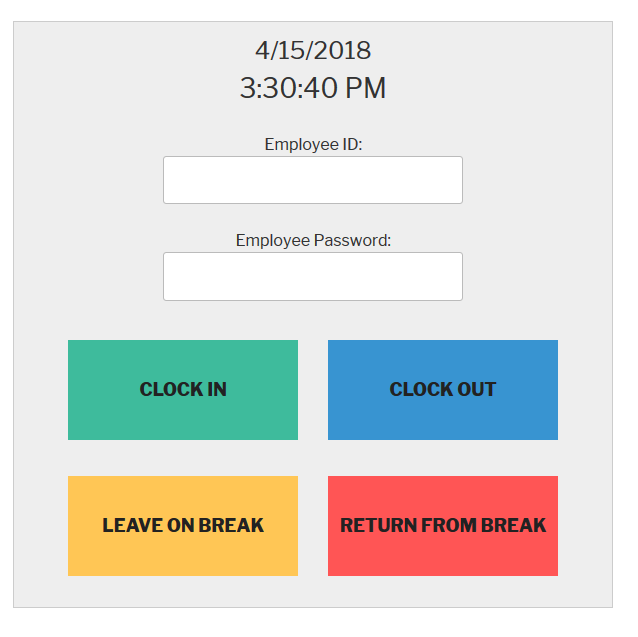
This plugin allows employees or volunteers to clock in and out for their work shifts.
From the Developer: I built this plugin because I’ve frequently volunteered at bicycle and computer repair non-profits, and each one was using a buggy, custom-made time clock to track hours. It caused the non-profit extra work and was a headache. So I built this plugin to help out other organizations in the same situation.
If you have a non-profit or a business, this plugin will help you track hours.
Having Problems?
If you are having problems or see a bug, please create a support thread here.
Watch this 2 minute video of how the plugin works:
Time Clock Features
- Users can clock in and out from shifts
- Users can clock in and out from lunch breaks
- Admins can easily make new user accounts
- Admins can view the number of hours worked for each day
- Admins can change the color and text of the time clock
Time Clock Pro
We offer a Pro version of this plugin for business owners who need more features.
- Export Activity to CSV File
- Time Clock can be used as a widget
- Admin Metrics
- See how many users are currently working
- Link a WordPress account to a Time Clock Account so users don’t have to login
About the Plugin Developer
This plugin was created by WP Plugin.
གཏུབ་རེིས།

སྒྲིག་འཇུག
Automatic Installation
- Sign in to your WordPress site as an administrator.
- In the main menu go to Plugins -> Add New.
- Search for TimeClock and click install.
གདེང་འཇོག


བྱས་རྗེས་འཇོག་མཁན། & གསར་འབྱེད་པ།
“Time Clock – A WordPress Employee & Volunteer Time Clock Plugin” is open source software. The following people have contributed to this plugin.
བྱས་རྗེས་འཇོག་མཁན།

Interested in development?
Browse the code, check out the SVN repository, or subscribe to the development log by RSS.
དག་བཅོས་ཉིན་ཐོ།
1.3.2
- 10/22/25
- Security Fix – Fixed Stored Cross-Site Scripting vulnerability (CVE-2025-10701)
- Security – Added input validation for clock action parameters
- Security – Added proper output escaping for HTML attributes and content
- Security – Implemented whitelist validation for all action types
1.3.1
- 5/1/25
- Fixed PHP Error – https://wordpress.org/support/topic/php-fatal-error-481/
1.3
- 5/1/25
- New – Plugin is now correctly setup for multi language support.
- Change – Modified deactivation survey.
- Fix – Security Fix
- Test – Tested with latest WordPress version
1.2.3
- 10/17/24
- Fix – Fixed browser autofill issue for logged out users / employees
- Fix – Made input boxes and font larger for the employee id and password fields
- Fix – Fixed tooltip / help text background color and opacity
- Fix – Security Fix
- Test – Tested with latest WordPress version
1.2.2
6/7/23
* Fix – Compatibility with PHP 8
1.2.1
7/18/18
* New – Added abiilty to change event type when editing user activity view
1.2
7/16/18
* New – Users can work past midnight
* New – Set date and time format on plugin’s settings page
* New – Admin can now add modify / delete times worked
* Fix – Reworked total time worked caculation
* Fix – Many bug fixes
1.1.2
5/31/18
* Fix – Fixed issue with multiple users logging into the timeclock at the same time.
1.1.1
5/23/18
* New – Added a deactivation survey to the plugin.
1.1
5/13/18
* New – Added the ability to see total time worked on the Activity Page.
* New – Added a dropdown menu on the Activity Page to sort by user.
* Fix – Fixed the total time worked caculations. Now it allows for mutiple shifts worked in any order per day.
1.0.1
4/17/18
* Fix – Time Clock shortcode theme styling issues.
1.0
4/17/18
* Initial release